
Don't miss your chance to take the Fabric Data Engineer (DP-600) exam for FREE! Find out how by watching the DP-600 session on-demand now through April 28th.
Learn moreJoin the FabCon + SQLCon recap series. Up next: Power BI, Real-Time Intelligence, IQ and AI, and Data Factory take center stage. All sessions are available on-demand after the live show. Register now
Hello,
We have the same issue with labels as in this post: How to remove Sensitivity Label - What permission/... - Microsoft Fabric Community but we are not sure if we are using the API correctly (we get a response code 401) as seen here: Admin - InformationProtection RemoveLabelsAsAdmin - REST API (Power BI Power BI REST APIs) | Microso...
We have many questions about that:
- Is it just a try page or we can use it to remove our labels?
- If so, what is the url we need to use to use it?
- Do we need to fill the header and parameter fields or is it enought to use the body field with the type and id?
Thanks!!
Thanks for your answer.
If I use postman, how can I find the address to connect to the API?
Regards
Hi @Jcorbalan ,
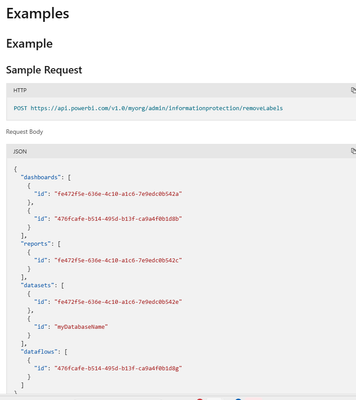
According to your requirement description, this documentation page supports directly doing "Try it" to try this rest API, you can click here and follow the request header and body of the example below to mimic and place your own label to do these operations.
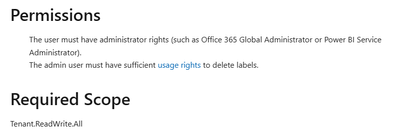
Regarding the permissions needed, if you are logged in with an AAD account, then your AAD account will need these permissions
There is a corresponding description in this part of the document
Also, if you want to use these APIs more formally and execute them in bulk, you can use postman to test and execute them as a professional job.
Postman API Platform | Sign Up for Free
Best Regards,
Liu Yang
If this post helps, then please consider Accept it as the solution to help the other members find it more quickly.
Check out the April 2026 Power BI update to learn about new features.
If you have recently started exploring Fabric, we'd love to hear how it's going. Your feedback can help with product improvements.
A new Power BI DataViz World Championship is coming this June! Don't miss out on submitting your entry.
| User | Count |
|---|---|
| 2 | |
| 1 | |
| 1 | |
| 1 | |
| 1 |
| User | Count |
|---|---|
| 8 | |
| 8 | |
| 4 | |
| 3 | |
| 2 |