Get Fabric or SQL Certified for Free.
Get certified for free when you join Fabric Data Days 2026 and dive into Fabric, Power BI, SQL, AI, and other essential data skills.
Join now- Power BI forums
- Get Help with Power BI
- Desktop
- Service
- Report Server
- Power Query
- Mobile Apps
- Developer
- DAX Commands and Tips
- Custom Visuals Development Discussion
- Health and Life Sciences
- Power BI Spanish forums
- Translated Spanish Desktop
- Training and Consulting
- Instructor Led Training
- Dashboard in a Day for Women, by Women
- Galleries
- Data Stories Gallery
- Themes Gallery
- Contests Gallery
- QuickViz Gallery
- Quick Measures Gallery
- Visual Calculations Gallery
- Fabric Apps Gallery
- Notebook Gallery
- Translytical Task Flow Gallery
- TMDL Gallery
- R Script Showcase
- Webinars and Video Gallery
- Ideas
- Custom Visuals Ideas (read-only)
- Issues
- Issues
- Events
- Upcoming Events
July 7 - July 17 | Round 2 of the Power BI Dataviz World Championships. Don't miss your chance! Learn more
- Power BI forums
- Forums
- Get Help with Power BI
- Developer
- Re: Refresh Multiple Datasets from ADF
- Subscribe to RSS Feed
- Mark Topic as New
- Mark Topic as Read
- Float this Topic for Current User
- Bookmark
- Subscribe
- Printer Friendly Page


- Mark as New
- Bookmark
- Subscribe
- Mute
- Subscribe to RSS Feed
- Permalink
- Report Inappropriate Content
Refresh Multiple Datasets from ADF
I've succesffuly set up refreshing a single power bi dataset from ADF, but now I need to be able to refresh multiple datasets within the same workspace from a single pipeline.
The way I attempted to set this up is by creating a variable array that contains two dataset guids
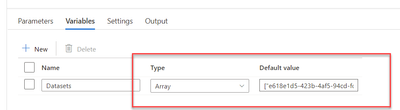
and in the ForEach Items field, referencing that variable:
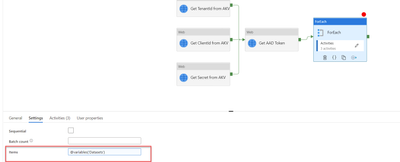
the first activity within the ForEach - WebActivity (which executes refresh of the dataset) would then reference item() in the URL where the dataset GUID would go.
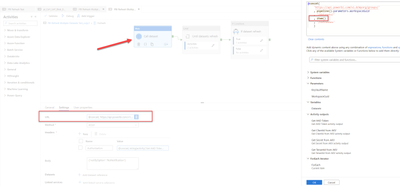
This is the error I get back:
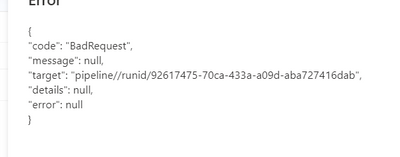
Again this worked for a single dataset refresh when referencing a parameter (single static dataset GUID) but now im trying to get this to work with refreshing multiple datasets by executing against the api in 2 concurrent executions using ForEach and 2 dataset GUIDs that I have stored in variable array..
Below is the entire json of the pipe:
{
"name": "PBI Refresh Multiple Datasets Test_copy1",
"properties": {
"activities": [
{
"name": "Get TenantId from AKV",
"type": "WebActivity",
"dependsOn": [],
"policy": {
"timeout": "0.00:10:00",
"retry": 0,
"retryIntervalInSeconds": 30,
"secureOutput": true,
"secureInput": false
},
"userProperties": [],
"typeProperties": {
"url": {
"value": "@concat(\n 'https://'\n , pipeline().parameters.KeyVaultName\n , '.vault.azure.net/secrets/TenantId/?api-version=7.1'\n )",
"type": "Expression"
},
"method": "GET",
"httpRequestTimeout": "00:01:00",
"authentication": {
"type": "MSI",
"resource": {
"value": "https://vault.azure.net",
"type": "Expression"
}
}
}
},
{
"name": "Get ClientId from AKV",
"type": "WebActivity",
"dependsOn": [],
"policy": {
"timeout": "0.00:10:00",
"retry": 0,
"retryIntervalInSeconds": 30,
"secureOutput": true,
"secureInput": false
},
"userProperties": [],
"typeProperties": {
"url": {
"value": "@concat(\n 'https://'\n , pipeline().parameters.KeyVaultName\n , '.vault.azure.net/secrets/ADO-PowerBI-SPN-AppID/?api-version=7.1'\n )",
"type": "Expression"
},
"method": "GET",
"httpRequestTimeout": "00:01:00",
"authentication": {
"type": "MSI",
"resource": {
"value": "https://vault.azure.net",
"type": "Expression"
}
}
}
},
{
"name": "Get Secret from AKV",
"type": "WebActivity",
"dependsOn": [],
"policy": {
"timeout": "0.00:10:00",
"retry": 0,
"retryIntervalInSeconds": 30,
"secureOutput": true,
"secureInput": false
},
"userProperties": [],
"typeProperties": {
"url": {
"value": "@concat(\n 'https://'\n , pipeline().parameters.KeyVaultName\n , '.vault.azure.net/secrets/ADO-PowerBI-SPN-Secret/?api-version=7.1'\n )",
"type": "Expression"
},
"method": "GET",
"httpRequestTimeout": "00:01:00",
"authentication": {
"type": "MSI",
"resource": {
"value": "https://vault.azure.net",
"type": "Expression"
}
}
}
},
{
"name": "Get AAD Token",
"type": "WebActivity",
"dependsOn": [
{
"activity": "Get ClientId from AKV",
"dependencyConditions": [
"Succeeded"
]
},
{
"activity": "Get TenantId from AKV",
"dependencyConditions": [
"Succeeded"
]
},
{
"activity": "Get Secret from AKV",
"dependencyConditions": [
"Succeeded"
]
}
],
"policy": {
"timeout": "7.00:0:00",
"retry": 0,
"retryIntervalInSeconds": 30,
"secureOutput": true,
"secureInput": true
},
"userProperties": [],
"typeProperties": {
"url": {
"value": "@concat(\n 'https://login.microsoftonline.com/'\n , activity('Get TenantId from AKV').output.value\n , '/oauth2/v2.0/token'\n )",
"type": "Expression"
},
"method": "POST",
"headers": {
"Content-Type": "application/x-www-form-urlencoded"
},
"body": {
"value": "@concat(\n 'grant_type=client_credentials&scope=https://analysis.windows.net/powerbi/api/.default&client_id=\n ',activity('Get ClientId from AKV').output.value,'&client_secret=\n ',encodeUriComponent(activity('Get Secret from AKV').output.value)\n)",
"type": "Expression"
},
"httpRequestTimeout": "00:01:00"
}
},
{
"name": "ForEach",
"type": "ForEach",
"dependsOn": [
{
"activity": "Get AAD Token",
"dependencyConditions": [
"Succeeded"
]
}
],
"userProperties": [],
"typeProperties": {
"items": {
"value": "@variables('Datasets')",
"type": "Expression"
},
"isSequential": false,
"activities": [
{
"name": "Call dataset",
"type": "WebActivity",
"dependsOn": [],
"policy": {
"timeout": "0.00:10:00",
"retry": 0,
"retryIntervalInSeconds": 30,
"secureOutput": false,
"secureInput": true
},
"userProperties": [],
"typeProperties": {
"url": {
"value": "@concat(\n 'https://api.powerbi.com/v1.0/myorg/groups/'\n , pipeline().parameters.WorkspaceGuid\n , '/datasets/'\n , item()\n , '/refreshes'\n )",
"type": "Expression"
},
"method": "POST",
"headers": {
"Authorization": {
"value": "@concat(\n string(activity('Get AAD Token').output.token_type)\n , ' '\n , string(activity('Get AAD Token').output.access_token)\n )",
"type": "Expression"
}
},
"body": {
"notifyOption": "NoNotification"
},
"httpRequestTimeout": "00:01:00",
"authentication": {
"type": "MSI",
"resource": {
"value": "https://vault.azure.net",
"type": "Expression"
}
}
}
},
{
"name": "Until datasets refresh",
"type": "Until",
"dependsOn": [
{
"activity": "Call dataset",
"dependencyConditions": [
"Succeeded"
]
}
],
"userProperties": [],
"typeProperties": {
"expression": {
"value": "@not(\n equals(\n first(\n json(\n string(\n activity('Get dataset refresh status').output\n )\n ).value\n ).status,'Unknown'\n )\n)",
"type": "Expression"
},
"activities": [
{
"name": "Get dataset refresh status",
"type": "WebActivity",
"dependsOn": [],
"policy": {
"timeout": "7.00:00:00",
"retry": 0,
"retryIntervalInSeconds": 30,
"secureOutput": false,
"secureInput": true
},
"userProperties": [],
"typeProperties": {
"url": {
"value": "@concat(\n 'https://api.powerbi.com/v1.0/myorg/groups/'\n ,pipeline().parameters.WorkspaceGuid\n ,'/datasets/',item()\n ,'/refreshes?$top=1'\n )",
"type": "Expression"
},
"method": "GET",
"headers": {
"Authorization": {
"value": "@concat(\n string(activity('Get AAD Token').output.token_type)\n , ' '\n , string(activity('Get AAD Token').output.access_token)\n )",
"type": "Expression"
},
"Content-Type": "application/json"
}
}
},
{
"name": "If dataset refresh unknown wait",
"type": "IfCondition",
"dependsOn": [
{
"activity": "Get dataset refresh status",
"dependencyConditions": [
"Succeeded"
]
}
],
"userProperties": [],
"typeProperties": {
"expression": {
"value": "@equals(\n first(\n json(\n string(\n activity('Get dataset refresh status').output\n )\n ).value\n ).status,'Unknown'\n)",
"type": "Expression"
},
"ifTrueActivities": [
{
"name": "wait 120 seconds_copy1",
"type": "Wait",
"dependsOn": [],
"userProperties": [],
"typeProperties": {
"waitTimeInSeconds": 120
}
}
]
}
}
],
"timeout": "0.03:00:00"
}
},
{
"name": "If dataset refresh",
"type": "IfCondition",
"dependsOn": [
{
"activity": "Until datasets refresh",
"dependencyConditions": [
"Succeeded"
]
}
],
"userProperties": [],
"typeProperties": {
"expression": {
"value": "@equals(\n first(\n json(\n string(\n activity('Get dataset refresh status').output\n )\n ).value\n ).status,'Failed'\n)",
"type": "Expression"
},
"ifTrueActivities": [
{
"name": "Fail_copy1",
"type": "Fail",
"dependsOn": [],
"userProperties": [],
"typeProperties": {
"message": {
"value": "@string(\n json(\n first(\n json(\n string(\n activity('Get dataset refresh status').output\n )\n ).value\n ).serviceExceptionJson\n )\n)",
"type": "Expression"
},
"errorCode": "1000"
}
}
]
}
}
]
}
}
],
"concurrency": 2,
"parameters": {
"KeyVaultName": {
"type": "string",
"defaultValue": "keyvault"
},
"WorkspaceGuid": {
"type": "string",
"defaultValue": "xxxxx-xxx-xxxx-xxxxxxxxxxxxxxxxxxxxx"
}
},
"variables": {
"Datasets": {
"type": "Array",
"defaultValue": [
"xxxxx-xxx-xxxx-xxxxxxxxxxxxxxxxxxxxx",
"xxxxx-xxx-xxxx-xxxxxxxxxxxxxxxxxxxxx"
]
}
},
"folder": {
"name": "UAT"
},
"annotations": []
}
}
Solved! Go to Solution.
- Mark as New
- Bookmark
- Subscribe
- Mute
- Subscribe to RSS Feed
- Permalink
- Report Inappropriate Content
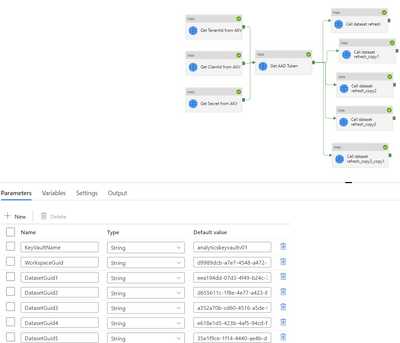
I came up with a workaround, i just set each distinct guid to a parameter and make a copy of the call dataset activity to refresh each dataset.
- Mark as New
- Bookmark
- Subscribe
- Mute
- Subscribe to RSS Feed
- Permalink
- Report Inappropriate Content
I came up with a workaround, i just set each distinct guid to a parameter and make a copy of the call dataset activity to refresh each dataset.

Helpful resources

FabCon & SQLCon – Barcelona 2026
Join us in Barcelona for FabCon and SQLCon, the Fabric, Power BI, SQL, and AI community event. Save €200 with code FABCMTY200.

Data Days 2026
Join Data Days 2026: 60 days of free live/on-demand sessions, challenges, study groups, and certification opportunities.

Power BI DataViz World Championships - June 2026
A new Power BI DataViz World Championship is coming this June! Don't miss out on submitting your entry.

| User | Count |
|---|---|
| 2 | |
| 2 | |
| 1 | |
| 1 | |
| 1 |


| User | Count |
|---|---|
| 4 | |
| 3 | |
| 2 | |
| 2 | |
| 1 |


