Join us at FabCon Atlanta from March 16 - 20, 2026, for the ultimate Fabric, Power BI, AI and SQL community-led event. Save $200 with code FABCOMM.
Register now!The Power BI Data Visualization World Championships is back! It's time to submit your entry. Live now!
Hi,
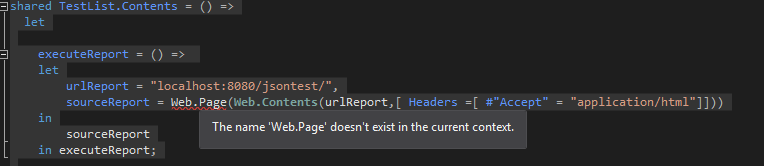
I'm trying to follow some examples that I found about parsing the content of a web page into a custom connector, but it is giving me an error : "The name 'Web.Page' doesn't exist in the current context".
This is my code:
// This file contains your Data Connector logic
section TestList;
[DataSource.Kind="TestList", Publish="TestList.Publish"]
shared TestList.Contents = () =>
let
executeReport = () =>
let
urlReport = "localhost:8080/jsontest/",
sourceReport = Web.Page(Web.Contents(urlReport,[ Headers =[ #"Accept" = "application/html"]]))
in
sourceReport
in executeReport;I'm using Visual Studio 2015, and the last version of the Power Query SDK (1.0.0.13),
Any idea of why I'm getting this error?
Regards
Solved! Go to Solution.
For any one who may have the same issue, this is confirmed as a known limitation. See this issue on Github.
The Power BI Data Visualization World Championships is back! It's time to submit your entry.
Check out the January 2026 Power BI update to learn about new features.
| User | Count |
|---|---|
| 3 | |
| 3 | |
| 2 | |
| 1 | |
| 1 |