This time we’re going bigger than ever. Fabric, Power BI, SQL, AI and more. We're covering it all. You won't want to miss it.
Learn moreLevel up your Power BI skills this month - build one visual each week and tell better stories with data! Get started
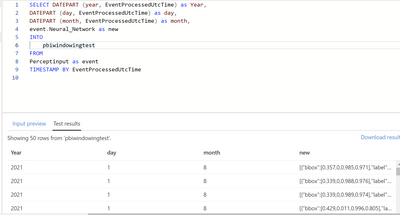
I have an Azure Percept with data feeding IoT Hub and then through Stream Analytics into PowerBI.
See below screenshot. My issue :
I am trying to parse out the nested JSON array inside the JSON message coming from the Azure Percept.
I am able to see the "new" field in the test results but want to isolate the bbox and label from the JSON array.
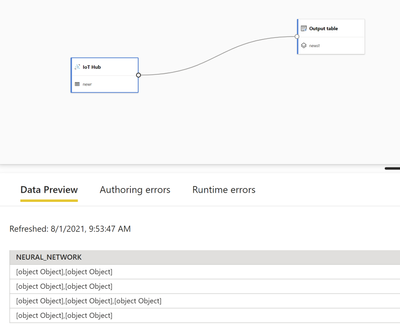
Also tried using Streaming Dataflows in Premium Per User Capacity but seeing the data come in as blobs called [object]
Solved! Go to Solution.
@V-lianl-msft Thanks for the link, that led me to search the web some more and I stumbled on https://docs.microsoft.com/en-us/azure/stream-analytics/stream-analytics-parsing-json which I then used to parse everything out with dot notation and GetArray functions. I still can't get the streaming dataflows to parse JSON so I have reposted that question in the PowerBI Desktop community forum.
Hi @Celwood , may I ask about your first posted screenshot? Where is it from and how to get to the screen?
I'm working with streaming dataflows, but I don't remember coming across that screen view.
Thanks!
Hi @Celwood ,
The blog once helped me solve similar problems.
Please refer to this blog:
https://www.cloudsma.com/2020/01/extracting-nested-fields-kusto/
Best Regards,
Liang
If this post helps, then please consider Accept it as the solution to help the other members find it more quickly.
@V-lianl-msft Thanks for the link, that led me to search the web some more and I stumbled on https://docs.microsoft.com/en-us/azure/stream-analytics/stream-analytics-parsing-json which I then used to parse everything out with dot notation and GetArray functions. I still can't get the streaming dataflows to parse JSON so I have reposted that question in the PowerBI Desktop community forum.
Check out the April 2026 Power BI update to learn about new features.
Sign up to receive a private message when registration opens and key events begin.
If you have recently started exploring Fabric, we'd love to hear how it's going. Your feedback can help with product improvements.