cancel
Showing results for 
Search instead for 
Did you mean: 

Learn from the best! Meet the four finalists headed to the FINALS of the Power BI Dataviz World Championships! Register now

Reply
Celwood
Frequent Visitor

PowerBI streaming analytics or Streaming Dataflows from Azure Percept : Query language question

I have an Azure Percept with data feeding IoT Hub and then through Stream Analytics into PowerBI.

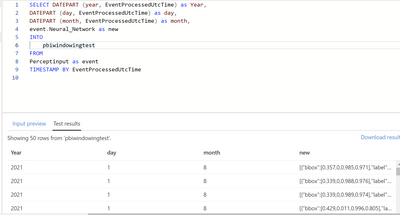
See below screenshot.  My issue :
I am trying to parse out the nested JSON array inside the JSON message coming from the Azure Percept.
I am able to see the "new" field in the test results but want to isolate the bbox and label from the JSON array.

SELECT 
     DATEPART (year, EventProcessedUtcTime) as Year,  
     DATEPART (day, EventProcessedUtcTime) as day, 
     DATEPART (month, EventProcessedUtcTime) as month, 
     event.Neural_Network as new
INTO
    pbiwindowingtest
FROM
     Perceptinput as event
     TIMESTAMP BY EventProcessedUtcTime


Celwood_0-1627825816602.png

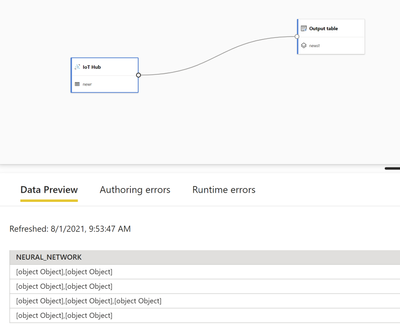
Also tried using Streaming Dataflows in Premium Per User Capacity but seeing the data come in as blobs called [object]

Celwood_1-1627826095662.png


1 ACCEPTED SOLUTION

@V-lianl-msft Thanks for the link, that led me to search the web some more and I stumbled on https://docs.microsoft.com/en-us/azure/stream-analytics/stream-analytics-parsing-json which I then used to parse everything out with dot notation and GetArray functions.  I still can't get the streaming dataflows to parse JSON so I have reposted that question in the PowerBI Desktop community forum.


View solution in original post

3 REPLIES 3
MrKrukauskas
Helper I
Helper I

Hi @Celwood , may I ask about your first posted screenshot? Where is it from and how to get to the screen?

I'm working with streaming dataflows, but I don't remember coming across that screen view.


Thanks!

V-lianl-msft
Community Support
Community Support

Hi @Celwood ,


The blog once helped me solve similar problems.

Please refer to this blog:

https://www.cloudsma.com/2020/01/extracting-nested-fields-kusto/ 


Best Regards,
Liang
If this post helps, then please consider Accept it as the solution to help the other members find it more quickly.

@V-lianl-msft Thanks for the link, that led me to search the web some more and I stumbled on https://docs.microsoft.com/en-us/azure/stream-analytics/stream-analytics-parsing-json which I then used to parse everything out with dot notation and GetArray functions.  I still can't get the streaming dataflows to parse JSON so I have reposted that question in the PowerBI Desktop community forum.


Helpful resources

Announcements
Join our Fabric User Panel

Join our Fabric User Panel

Share feedback directly with Fabric product managers, participate in targeted research studies and influence the Fabric roadmap.

February Power BI Update Carousel

Power BI Monthly Update - February 2026

Check out the February 2026 Power BI update to learn about new features.

FabCon Atlanta 2026 carousel

FabCon Atlanta 2026

Join us at FabCon Atlanta, March 16-20, for the ultimate Fabric, Power BI, AI and SQL community-led event. Save $200 with code FABCOMM.