Join us in Barcelona for FabCon and SQLCon, September 28 - October 1, 2026.
This is best Fabric, Power BI, SQL and AI community event. How do we know? The last event sold out! Save €200 with code FABCMTY200.
Register now- Power BI forums
- Get Help with Power BI
- Desktop
- Service
- Report Server
- Power Query
- Mobile Apps
- Developer
- DAX Commands and Tips
- Custom Visuals Development Discussion
- Health and Life Sciences
- Power BI Spanish forums
- Translated Spanish Desktop
- Training and Consulting
- Instructor Led Training
- Dashboard in a Day for Women, by Women
- Galleries
- Data Stories Gallery
- Themes Gallery
- Contests Gallery
- QuickViz Gallery
- Quick Measures Gallery
- Visual Calculations Gallery
- Fabric Apps Gallery
- Notebook Gallery
- Translytical Task Flow Gallery
- TMDL Gallery
- R Script Showcase
- Webinars and Video Gallery
- Ideas
- Custom Visuals Ideas (read-only)
- Issues
- Issues
- Events
- Upcoming Events
The Fabric community is now in read-only for platform upgrade. Learn more
- Power BI forums
- Forums
- Get Help with Power BI
- Developer
- Re: PowerBI Embedded Visuals won't load (DirectQue...
- Subscribe to RSS Feed
- Mark Topic as New
- Mark Topic as Read
- Float this Topic for Current User
- Bookmark
- Subscribe
- Printer Friendly Page

- Mark as New
- Bookmark
- Subscribe
- Mute
- Subscribe to RSS Feed
- Permalink
PowerBI Embedded Visuals won't load (DirectQuery)
Hi All,
Since this morning all visuals in powerbi embedded won't load. The report works with direct query and worked fine yesterday. Furthermore, the report works fine locally from PBI desktop.
I'am experiencing issues with all my PBI embedded workspaces and reports. Underneath an image of the error;
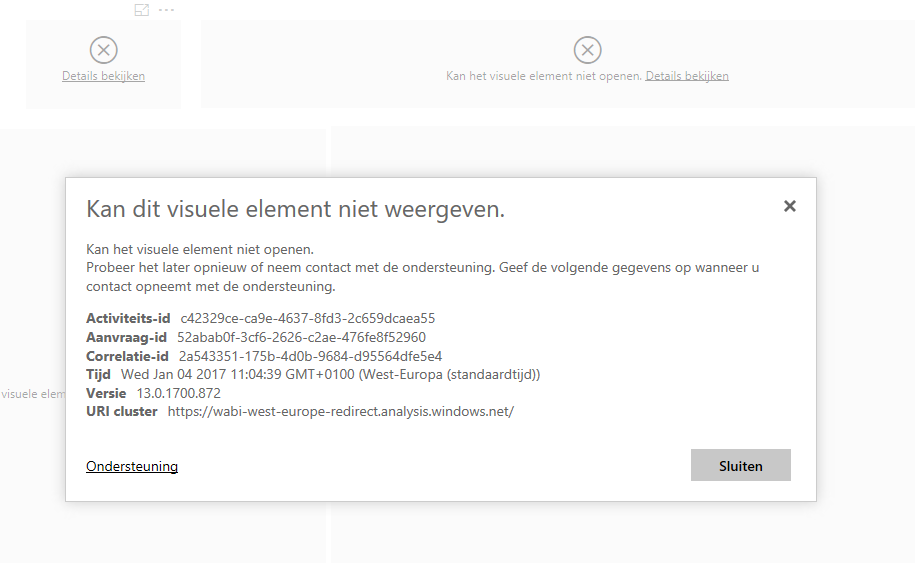
Is anyone else experiencing these issues or does anyone have a solution?
I'll be happy to hear from you. Kind regards Arjen
Solved! Go to Solution.

- Mark as New
- Bookmark
- Subscribe
- Mute
- Subscribe to RSS Feed
- Permalink
Thanks for reporting.
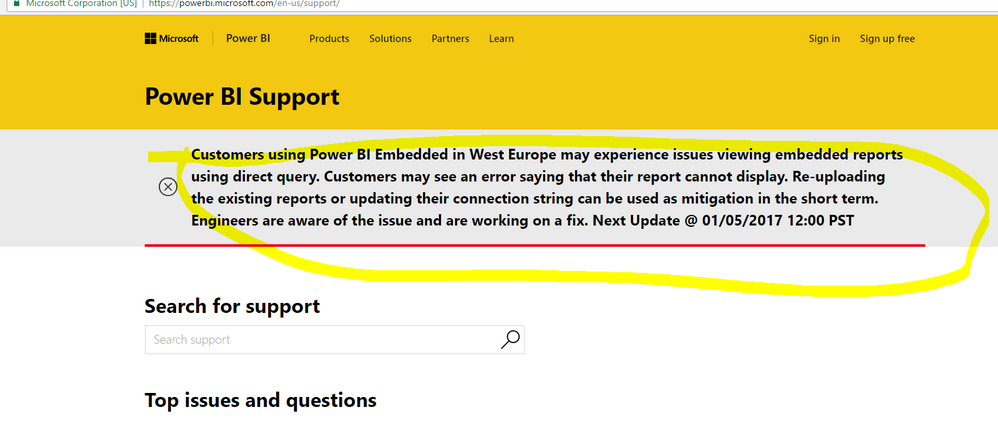
It is a known issue and engineers are working on a fix. You can find the update at the support site.
The workaround offered is to re-uploading the existing reports or updating their connection string.
- Mark as New
- Bookmark
- Subscribe
- Mute
- Subscribe to RSS Feed
- Permalink
Thanks for reporting.
It is a known issue and engineers are working on a fix. You can find the update at the support site.
The workaround offered is to re-uploading the existing reports or updating their connection string.

- Mark as New
- Bookmark
- Subscribe
- Mute
- Subscribe to RSS Feed
- Permalink
I am stuck with this problem. I am in Australia SouthEast but m also getting the same error. I tried updating connection string but nothing happens. I tried to pass crendential using GateWay data source but no luck.
Note- I am using Direct query in my reports
Please suggest


- Mark as New
- Bookmark
- Subscribe
- Mute
- Subscribe to RSS Feed
- Permalink
Wasn't it possible to only update the connection string for each report to get it working again?
- Mark as New
- Bookmark
- Subscribe
- Mute
- Subscribe to RSS Feed
- Permalink
This seems to be a Microsoft issue. Possibly only in west Europe. Here's another thread about it:
http://community.powerbi.com/t5/Issues/No-visuals-rendering-in-PowerBI-embedded-web-app/idi-p/108801

Helpful resources

FabCon & SQLCon – Barcelona 2026
Join us in Barcelona for FabCon and SQLCon, the Fabric, Power BI, SQL, and AI community event. Save €200 with code FABCMTY200.

Power BI DataViz World Championships - June 2026
A new Power BI DataViz World Championship is coming this June! Don't miss out on submitting your entry.

| User | Count |
|---|---|
| 2 | |
| 1 | |
| 1 | |
| 1 | |
| 1 |


| User | Count |
|---|---|
| 1 | |
| 1 | |
| 1 | |
| 1 | |
| 1 |


