This is best Fabric, Power BI, SQL and AI community event. How do we know? The last event sold out! Save €200 with code FABCMTY200.
Register nowA new Data Days event is coming soon! This time we’re going bigger than ever. Fabric, Power BI, SQL, AI and more. Don't miss out.
I have the following input from a text file:
11,1,11,DT:17.09.18/13:04:30
11,2,12,NR:5963
11,3,13,NR:102
11,4,21,NR:200170006
11,4,23,NR:200170000
11,4,24,TX:'1'
11,4,31,CA:1/3.5
11,5,11,DT:17.09.18/16:53:13
11,6,12,NR:5423
11,7,13,NR:5
11,8,21,NR:200010002
11,8,23,NR:200010000
11,8,24,TX:'1'
11,8,31,CA:1/3.8
Column 1: constant (11)
Column 2: consecutive counter
Column 3: row type (e.g. 11 = Date; 12: Key for person; 21: product key; 23: product group key; 31: number of units and revenue
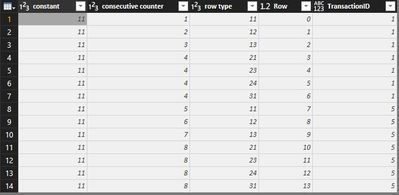
The rows with types 11 always embed a unit of transaction and I'd like to create a new column, which holds an identifier for the transaction. This could be the counter (Col 2) of the date row (Col 3 = 11).
That means, for each row, the value of column 2 of the last previous row of type 11 has to be found. In the above example, the new column would hold 1 for the first seven rows and 5 for the last seven rows.
That's quite easy in DAX, but I'd like to do it on the Power Query level in M.
Any ideas?
Thanks ind advance
Frank
Solved! Go to Solution.
Hi @fbackes,
I think I found a solution for you.
1. Add index column
2. Calculate transaction ID per each row as per below code (see Result step):
let
//Entered your data
Source = Table.FromRows(Json.Document(Binary.Decompress(Binary.FromText("i45WMjRU0lECY0OlWB0o3wjEN0LwjUF8YwTfBKTGEI2PLm+CyjdGUm+KZp8Zmn3maPZZoNlngWafBZp9FlD7YgE=", BinaryEncoding.Base64), Compression.Deflate)), let _t = ((type text) meta [Serialized.Text = true]) in type table [constant = _t, #"consecutive counter" = _t, #"row type" = _t]),
ChangedDataTypes = Table.TransformColumnTypes(Source,{{"constant", Int64.Type}, {"consecutive counter", Int64.Type}, {"row type", Int64.Type}}),
//Add index starting from zero
AddIndexColumn = Table.AddIndexColumn(ChangedDataTypes, "Row", 0, 1),
//Calculate transaction id
Result =
Table.AddColumn(AddIndexColumn, "TransactionID",
each
let
Ix = [Row],
value = List.Last(Table.SelectRows(AddIndexColumn,each [Row]<=Ix and [row type] = 11)[consecutive counter])
in
value
)
in
Result
Regards,
Ruslan
-------------------------------------------------------------------
Did I answer your question? Mark my post as a solution!
Hi @fbackes,
I think I found a solution for you.
1. Add index column
2. Calculate transaction ID per each row as per below code (see Result step):
let
//Entered your data
Source = Table.FromRows(Json.Document(Binary.Decompress(Binary.FromText("i45WMjRU0lECY0OlWB0o3wjEN0LwjUF8YwTfBKTGEI2PLm+CyjdGUm+KZp8Zmn3maPZZoNlngWafBZp9FlD7YgE=", BinaryEncoding.Base64), Compression.Deflate)), let _t = ((type text) meta [Serialized.Text = true]) in type table [constant = _t, #"consecutive counter" = _t, #"row type" = _t]),
ChangedDataTypes = Table.TransformColumnTypes(Source,{{"constant", Int64.Type}, {"consecutive counter", Int64.Type}, {"row type", Int64.Type}}),
//Add index starting from zero
AddIndexColumn = Table.AddIndexColumn(ChangedDataTypes, "Row", 0, 1),
//Calculate transaction id
Result =
Table.AddColumn(AddIndexColumn, "TransactionID",
each
let
Ix = [Row],
value = List.Last(Table.SelectRows(AddIndexColumn,each [Row]<=Ix and [row type] = 11)[consecutive counter])
in
value
)
in
Result
Regards,
Ruslan
-------------------------------------------------------------------
Did I answer your question? Mark my post as a solution!
Many thanks, Ruslan! It works perfect.
Best regards
Frank
Check out the May 2026 Power BI update to learn about new features.
Sign up to receive a private message when registration opens and key events begin.
If you have recently started exploring Fabric, we'd love to hear how it's going. Your feedback can help with product improvements.
| User | Count |
|---|---|
| 2 | |
| 1 | |
| 1 | |
| 1 | |
| 1 |