Join us at FabCon Atlanta from March 16 - 20, 2026, for the ultimate Fabric, Power BI, AI and SQL community-led event. Save $200 with code FABCOMM.
Register now!Vote for your favorite vizzies from the Power BI Dataviz World Championship submissions. Vote now!
Hello, I am brand new to PowerBI and trying to get my head around it.
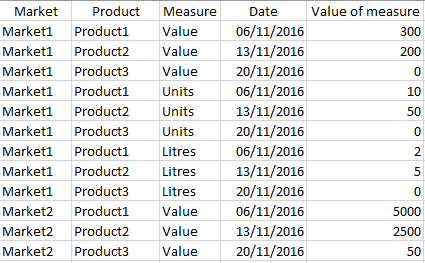
I have a dataset with numerous columns like Product, Market etc, but the ones of interest are: Date (having as entries all the dates), Measures (with 6 unique entries e.g. Value, Litres, Units) and Value of measure (having as entries the value of each measure). A sample of the dataset looks like this:
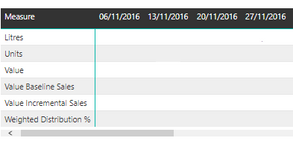
At the moment I have created a matrix visualisation using these 3 columns that looks like this:
* for the purpose of sharing the photo I have removed the entries in the rows
I want to add 2 rows below these, that will be calculated from the previous rows of the matrix, Measure1: Value/ Units and Measure2: Value/Litres but I want these to be dynamic, so when someone drills down the report these will be adjusted.
It's something that is done so easily in excel and I find it furstating that I cannot find a way to do it in PowerBI. Is there anyone that can help me out?
Vote for your favorite vizzies from the Power BI World Championship submissions!
If you love stickers, then you will definitely want to check out our Community Sticker Challenge!
Check out the January 2026 Power BI update to learn about new features.
| User | Count |
|---|---|
| 3 | |
| 2 | |
| 2 | |
| 2 | |
| 1 |
| User | Count |
|---|---|
| 6 | |
| 4 | |
| 3 | |
| 2 | |
| 2 |