Join us at FabCon Atlanta from March 16 - 20, 2026, for the ultimate Fabric, Power BI, AI and SQL community-led event. Save $200 with code FABCOMM.
Register now!The Power BI Data Visualization World Championships is back! Get ahead of the game and start preparing now! Learn more
This is very impressive webinar about multilanguage reports
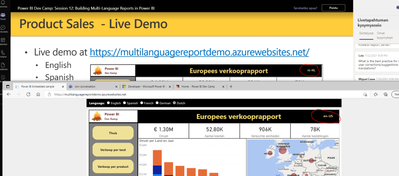
Are there any changes happening in the Power BI JavaScript API? Live demo (https://multilanguagereportdemo.azurewebsites.net/) does not work correctly today. UserCulture funktion return 'en-US' value for all report sizes. Yesterday it worked correctly.
I made my own PBI multi-language report with the same technigue: yesterday it worked correctly, but today userculture return 'en-US' value to all.
Hi,
thank you so much for this advice. We have just making these config changes to our own embed report, but we noticed about hour ago that live demo report works correct again! Power BI Embedded sample (multilanguagereportdemo.azurewebsites.net)
Has Microsoft made any corrections to "userculture"-funktion due this ticket? We hope that it works correctly at all times.
Best regards,
Mari
Hi Liang,
Ted Pattison, Microsoft principal program manager with Power BI, has made this live demo using import mode
Power BI Embedded sample (multilanguagereportdemo.azurewebsites.net)
Earlier in this live demo UserCulture funktion return correct value, but from Thursday 12 of August userculture return 'en-US' value for all cases. This same Power BI Desktop file works fine in PowerBI Desktop and userculture return correct value in there.
Best Regards,
Mari
Hi @marilaitala ,
In import mode, does the userculture function return the correct value?
If you connect to SSAS using a live connection,please try configuring the language of each user in a table and implement the translations in a similar way of the Row Level Security.
Best Regards,
Liang
If this post helps, then please consider Accept it as the solution to help the other members find it more quickly.
We experience the same issue. Is there a solution yet?
When we embed a report we perform the following:-
const lang = this.user ? this.user.profile['locale'] : 'en-GB';
const config: any = {
type: 'report',
id: this.id,
embedUrl: this.embedUrl,
accessToken: this.accessToken,
tokenType: pbi.models.TokenType.Embed,
settings: {
filterPaneEnabled: true,
navContentPaneEnabled: true,
layoutType: this.layout,
localeSettings: {
language: lang,
formatLocale: lang
}
}
};
const divElement: HTMLElement = <HTMLElement>this.powerBIReports.nativeElement;
this.powerbi.reset(divElement);
this.report = this.powerbi.embed(divElement, config);
You can see from the example above that we are passing a culture in the localeSettings
Within our report itself we have a dax expression similar to:-
VAR UC = CALCULATE(MIN(usercultures[Locale]),FILTER(usercultures,usercultures[Code] = USERCULTURE()))
Return UC
The USERCULTURE() no longer resolves to the culture passed in when embedded (see highlighted red), it evaluates as en-US
We have also logged this as a ticket with Microsoft.
Hi, I am experiencing the same issue now, with powerbi js client v. 2.23.1. USERCULTURE() is not reflecting the specified localeSettings in embedded mode. Did this eventually work for you (long time ago now I realize...)?
The Power BI Data Visualization World Championships is back! Get ahead of the game and start preparing now!
| User | Count |
|---|---|
| 3 | |
| 2 | |
| 2 | |
| 1 | |
| 1 |
| User | Count |
|---|---|
| 11 | |
| 7 | |
| 4 | |
| 4 | |
| 3 |