cancel
Showing results for 
Search instead for 
Did you mean: 

Try your skills in the Power BI Dataviz World Championship! Round one ends June 26. Join now

Reply
trevorgermain
Advocate I
Advocate I

Power BI Embedded - DirectQuery dynamic parameters

I would like to be able to embed Power BI report, and be able to do a DirectQuery against my datasource based on the currently logged in user.


The only way I've been able to get this to work is to use the Username function in DAX, but by the time DAX is available, I'd have already had to load WAY too much data (not relevent data) into my model.


Can I filter at the PowerQuery?

1 ACCEPTED SOLUTION
Eric_Zhang
Microsoft Employee
Microsoft Employee


@trevorgermain wrote:

I would like to be able to embed Power BI report, and be able to do a DirectQuery against my datasource based on the currently logged in user.


The only way I've been able to get this to work is to use the Username function in DAX, but by the time DAX is available, I'd have already had to load WAY too much data (not relevent data) into my model.


Can I filter at the PowerQuery?


@trevorgermain

That is the only approach possible I'm aware of. As to "load too much data", you may don't worry about that. Because in DirectQuery mode, it doesn't load all data from database and then apply a filter. Instead, Power BI composes a proper SQL with the filter and send the SQL to database. Eg. in my test, I capture the below in my test with SQL Server profiler, the WHERE clause is appended due to USERNAME() filter.
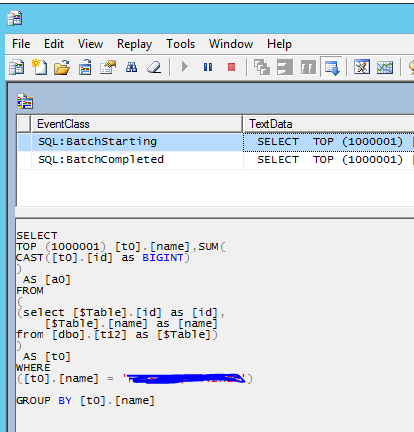
Capture.PNG

View solution in original post

2 REPLIES 2
Eric_Zhang
Microsoft Employee
Microsoft Employee


@trevorgermain wrote:

I would like to be able to embed Power BI report, and be able to do a DirectQuery against my datasource based on the currently logged in user.


The only way I've been able to get this to work is to use the Username function in DAX, but by the time DAX is available, I'd have already had to load WAY too much data (not relevent data) into my model.


Can I filter at the PowerQuery?


@trevorgermain

That is the only approach possible I'm aware of. As to "load too much data", you may don't worry about that. Because in DirectQuery mode, it doesn't load all data from database and then apply a filter. Instead, Power BI composes a proper SQL with the filter and send the SQL to database. Eg. in my test, I capture the below in my test with SQL Server profiler, the WHERE clause is appended due to USERNAME() filter.

Capture.PNG

I've been mostly using Import mode, and have a new requirement where DirectQuery may make the most sense. Thank you for your response. I tried the exact thing you suggested and am seeing proper filtering on the query in SQL Profiler.

Helpful resources

Announcements
Fabric Data Days is here Carousel

Fabric Data Days 2026

Don't miss out on Data Days, June 15 through August 7. Learn Fabric, Power BI, SQL, AI and more.

Power BI DataViz World Championships carousel

Power BI DataViz World Championships - June 2026

A new Power BI DataViz World Championship is coming this June! Don't miss out on submitting your entry.