cancel
Showing results for 
Search instead for 
Did you mean: 

We've captured the moments from FabCon & SQLCon that everyone is talking about, and we are bringing them to the community, live and on-demand. Starts on April 14th. Register now

Reply
daykirby
Frequent Visitor

Power BI Embedded Bing Map Limits

It seems like there is a limit to the number of points that the Bing map report will display.

First of all, is this the case, and if so what is the limit?

Second, is there a workaround. This is absolutely a critical business issue for me.


6 REPLIES 6
Eric_Zhang
Microsoft Employee
Microsoft Employee


@daykirby wrote:

It seems like there is a limit to the number of points that the Bing map report will display.

First of all, is this the case, and if so what is the limit?

Second, is there a workaround. This is absolutely a critical business issue for me.


Could you be more specific about the visual you're talking about? I'm not aware of any visual called Bing map, the built-in map and filled map visuals actually uses Bing map, though.


I'm also not aware of the mentioned limitation, have your encountered any issue when using Power BI Embedded?


Yes, I'm talking about the built-in map visual, which is a Bing map.

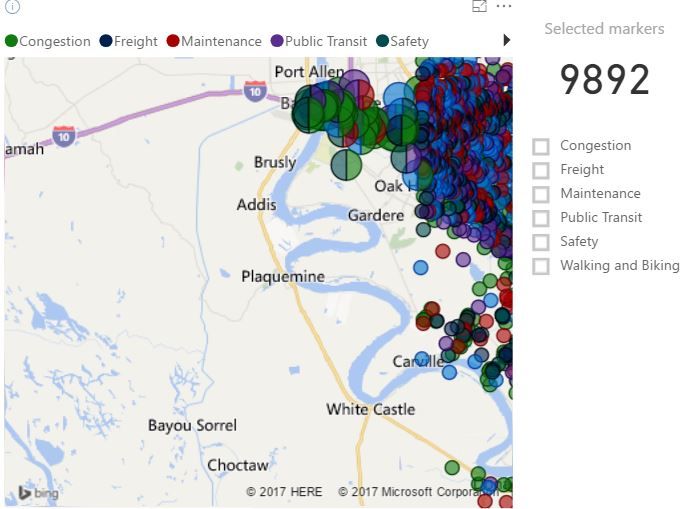
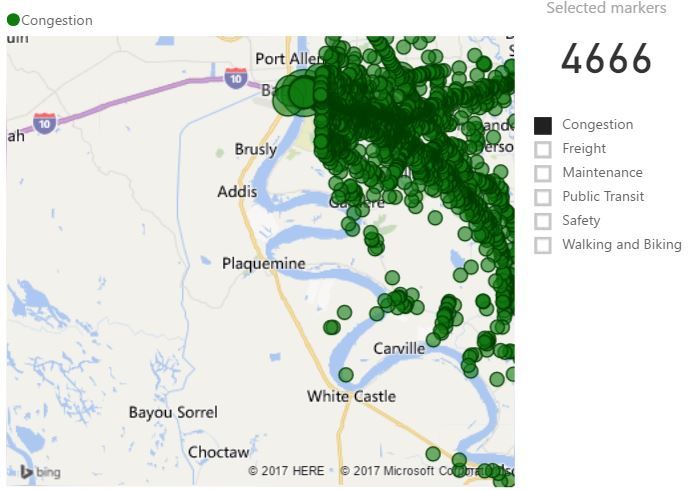
There is definitely some kind of limit, or a bug. I have a map with over 4K markers that doesn't display all my markers (with no filter), but I can add a filter that suddenly displays the missing markers.

@daykirby

Do you mind sharing me the problematic pbix file, so that I can reproduce the issue? After identifying the issue, we'll report it to the product team.

I don't really want to send a pbix file with our customer's data in it. I will send a couple of screenshots. 

Here is a shot of unfiltered markers, followed by filtered markers, which suddenly show new markers. The only thing I'm changing is the filter by clicking on congestion.

unfiltered, with missing markersunfiltered, with missing markersfiltered, showing some of the markers that were missingfiltered, showing some of the markers that were missing


@Eric_Zhang any word on this?

Helpful resources

Announcements
New to Fabric survey Carousel

New to Fabric Survey

If you have recently started exploring Fabric, we'd love to hear how it's going. Your feedback can help with product improvements.

Power BI DataViz World Championships carousel

Power BI DataViz World Championships - June 2026

A new Power BI DataViz World Championship is coming this June! Don't miss out on submitting your entry.

Join our Fabric User Panel

Join our Fabric User Panel

Share feedback directly with Fabric product managers, participate in targeted research studies and influence the Fabric roadmap.

March Power BI Update Carousel

Power BI Community Update - March 2026

Check out the March 2026 Power BI update to learn about new features.