Join us at FabCon Atlanta from March 16 - 20, 2026, for the ultimate Fabric, Power BI, AI and SQL community-led event. Save $200 with code FABCOMM.
Register now!The Power BI Data Visualization World Championships is back! It's time to submit your entry. Live now!
I am trying to create tree structure in Power BI uing d3@3.5.5. But I am having some issue with it. I have a simple update function as shown below.
public update(options: VisualUpdateOptions) {
console.log("hello1");
var tree = d3.layout.tree()
.size([400, 400]);
console.log("hello2");
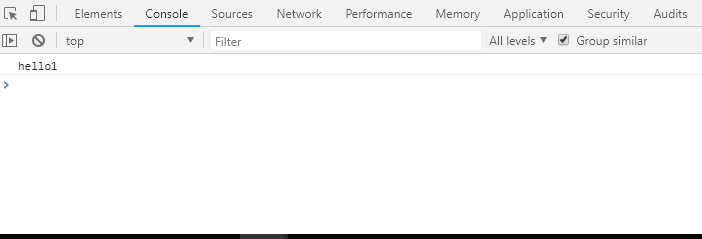
}As you can see in above code, I am priting hello1 to console then creating tree object using d3 then printing hello2 to finish off. The problem is that I can see the hello1 on the console but I can not see hello2 no matter how many time I refresh the visual. See screenshot of console below.
Can someone please tell me why I can not see hello2 into the console?
Solved! Go to Solution.
There's a JavaScript exception. Our recommendation is to wrap update into try-catch to figure out a root of this issue.
public update(options: VisualUpdateOptions) {
console.log("hello1");
try {
var tree = d3.layout.tree()
.size([400, 400]);
} catch(e) {
console.log(e);
}
console.log("hello2");
}
Ignat Vilesov,
Software Engineer
Microsoft Power BI Custom Visuals
There's a JavaScript exception. Our recommendation is to wrap update into try-catch to figure out a root of this issue.
public update(options: VisualUpdateOptions) {
console.log("hello1");
try {
var tree = d3.layout.tree()
.size([400, 400]);
} catch(e) {
console.log(e);
}
console.log("hello2");
}
Ignat Vilesov,
Software Engineer
Microsoft Power BI Custom Visuals
The Power BI Data Visualization World Championships is back! It's time to submit your entry.
Check out the January 2026 Power BI update to learn about new features.
| User | Count |
|---|---|
| 3 | |
| 3 | |
| 2 | |
| 1 | |
| 1 |
| User | Count |
|---|---|
| 6 | |
| 3 | |
| 3 | |
| 2 | |
| 2 |