Join us at FabCon Atlanta from March 16 - 20, 2026, for the ultimate Fabric, Power BI, AI and SQL community-led event. Save $200 with code FABCOMM.
Register now!Vote for your favorite vizzies from the Power BI Dataviz World Championship submissions. Vote now!
Hi
I'm trying to add parameters in my queries to reduce the size of the retrieved data and create this parameter as a slicer in the dashboard, this is because I need this parameter available in the dashboard to allow the users to filter the data, but for some reason, I can't bind the table to a parameter, I am using the ODBC connector to pull the data
Solved! Go to Solution.
Hi @Anonymous ,
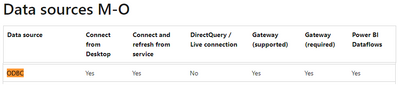
As far as I know, ODBC connector could only load data by import connection mode.
Dynamic M query parameters give model authors more control over the filter selections to incorporate into DirectQuery source queries.
For reference:
Dynamic M query parameters in Power BI Desktop
So you couldn't use dynamic m query parameters in your report.
Best Regards,
Rico Zhou
If this post helps, then please consider Accept it as the solution to help the other members find it more quickly.
Hi @Anonymous ,
As far as I know, ODBC connector could only load data by import connection mode.
Dynamic M query parameters give model authors more control over the filter selections to incorporate into DirectQuery source queries.
For reference:
Dynamic M query parameters in Power BI Desktop
So you couldn't use dynamic m query parameters in your report.
Best Regards,
Rico Zhou
If this post helps, then please consider Accept it as the solution to help the other members find it more quickly.
Vote for your favorite vizzies from the Power BI World Championship submissions!
If you love stickers, then you will definitely want to check out our Community Sticker Challenge!
Check out the January 2026 Power BI update to learn about new features.
| User | Count |
|---|---|
| 3 | |
| 2 | |
| 1 | |
| 1 | |
| 1 |
| User | Count |
|---|---|
| 4 | |
| 3 | |
| 3 | |
| 2 | |
| 2 |