Join us at FabCon Atlanta from March 16 - 20, 2026, for the ultimate Fabric, Power BI, AI and SQL community-led event. Save $200 with code FABCOMM.
Register now!Learn from the best! Meet the four finalists headed to the FINALS of the Power BI Dataviz World Championships! Register now
so i have an API link to get data, it requires simply a post command with the api link and some body information
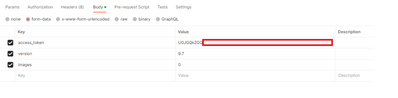
the body info is as followed:
This works fine in Postman and I get the data in JSON format, but im curious how i can do the same in Power BI. Any help is appreciated 🙂
Also a second thing would be to make a script to receive the access token
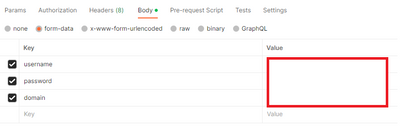
It's a simple Post login link where the body is as follows:
So the password and username and domain is given in the body, not in the authorization tab in Postman.
Solved! Go to Solution.
Hi @SteffH ,
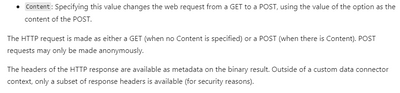
While the Power Query Web.Contents() function generates a GET request by default, you can make it generate a POST request by specifying the Content option.
For more details, please refer to:
Web.Contents - PowerQuery M | Microsoft Learn
Chris Webb's BI Blog: Web Services And POST Requests In Power Query
Best Regards,
Jianbo Li
If this post helps, then please consider Accept it as the solution to help the other members find it more quickly.
Hi @SteffH ,
While the Power Query Web.Contents() function generates a GET request by default, you can make it generate a POST request by specifying the Content option.
For more details, please refer to:
Web.Contents - PowerQuery M | Microsoft Learn
Chris Webb's BI Blog: Web Services And POST Requests In Power Query
Best Regards,
Jianbo Li
If this post helps, then please consider Accept it as the solution to help the other members find it more quickly.
Hi @SteffH ,
Based on your description, I will use Datasets - Get Dataset In Group API as an example:
let
//Get API Token
tokenapiUrl = "https://login.microsoftonline.com/ecxxxxxxxx/oauth2/v2.0/token",
body = [
client_id="d32xxxxxx",
grant_type="client_credentials",
client_secret="vMfxxxxxx",
scope="https://analysis.windows.net/powerbi/api/.default"
],
API_Response = Json.Document(Web.Contents(tokenapiUrl, [Headers = [Accept = "application/json"],
Content = Text.ToBinary(Uri.BuildQueryString(body))])),
token = API_Response[access_token],
//Get Data
apiUrl = "https://api.powerbi.com/v1.0/myorg/groups/476xxxxxxx/datasets/3a7xxxxxx",
data = Json.Document(Web.Contents(apiUrl,[Headers=[#"Authorization"="Bearer "&token,#"Content-Type"="application/json"]]))
in
data
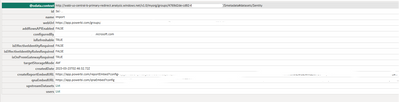
Final output:
Best Regards,
Jianbo Li
If this post helps, then please consider Accept it as the solution to help the other members find it more quickly.
Hi Jianboli,
First of all thanks for the detailed answer, however i think I'm running into one problem, the following things are given in the body of the getData call (not in the headers):
- access_token=
- version= (9.5 for example)
- images= (0 for example)
I'm dealing with a POST request, not a get request, and these parameters will not work when given as a header, but only when given in the body.
Any help is appreciated btw 🙂
Share feedback directly with Fabric product managers, participate in targeted research studies and influence the Fabric roadmap.
Check out the February 2026 Power BI update to learn about new features.
| User | Count |
|---|---|
| 3 | |
| 2 | |
| 1 | |
| 1 | |
| 1 |
| User | Count |
|---|---|
| 3 | |
| 3 | |
| 2 | |
| 2 | |
| 2 |