Learn from the best! Meet the four finalists headed to the FINALS of the Power BI Dataviz World Championships! Register now
Hi All,
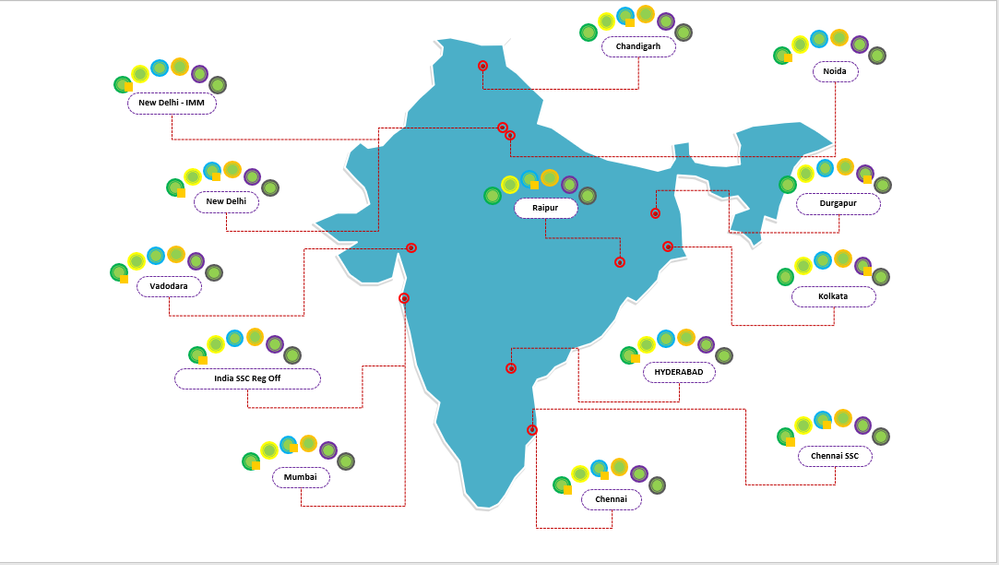
We have a requirement to create a visualization similar to the below one where we can visualize country wise sites health as per there categories.
In the below visual you can see there are 6 circles which denote 6 categories like Application, Security, IDM, etc with colors as Green, Yellow, Blue, Orange, Purple, Black and beside there there is one orange square box which denotes the City-Category wise percentage. So if percentage is >95 it would be Green, 90-95 should be Orange & <90 should be Red.
How do we acheive this Visualization?
You may use PureViz Infographic custom visual for this design I guess. There is a similar map design in sample visuals in this video and it allows you to design visual in Power Point and then use in Power BI.
It is not published on App Source yet, but you can dowload visual from it's website. PureViz Infographic for Power BI
If you have recently started exploring Fabric, we'd love to hear how it's going. Your feedback can help with product improvements.
A new Power BI DataViz World Championship is coming this June! Don't miss out on submitting your entry.
Share feedback directly with Fabric product managers, participate in targeted research studies and influence the Fabric roadmap.
| User | Count |
|---|---|
| 4 | |
| 2 | |
| 2 | |
| 2 | |
| 2 |