cancel
Showing results for 
Search instead for 
Did you mean: 

Get Fabric Certified for FREE during Fabric Data Days. Don't miss your chance! Learn more

Reply
BhuvaraghanJK
New Member

Mongo DB Live/Direct Query

Hi All,


In data sources capabilities I saw (Link) , ODBC is only supported for manual refresh. Since we are using Mongo DB, ODBC is the only option. Is there any way to link the data using data query or live connection as we are planning to embed the dashboard in the tool we are building. Setting a manual refresh will not work in our scenario.


Thanks for the help.

1 ACCEPTED SOLUTION
Anonymous
Not applicable

Hi @BhuvaraghanJK 

If your data source support Live or Direct Query in Power BI, you can choose the connection mode when you connect to your data source, just like SQL Sever, you can choose Direct Query or Import.

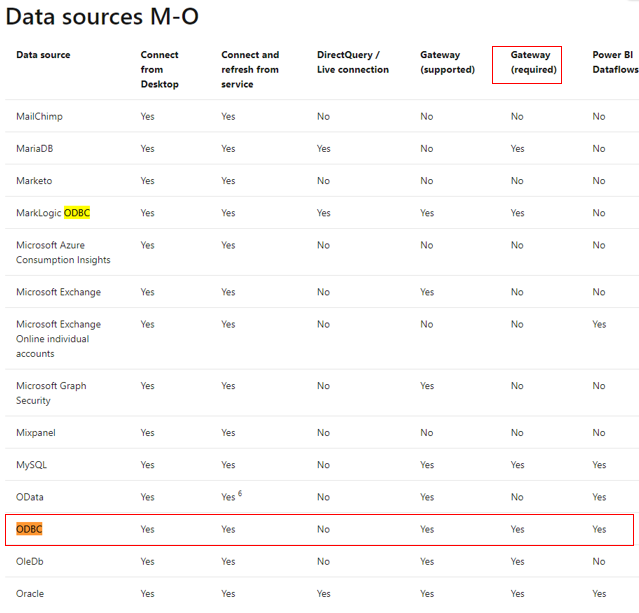
From the data source link, we can find that ODBC connector requires gateway to refresh the data source. So you need to configure your data source credential in gateway to refresh your report in Power BI Service.

1.png

I think manual refresh means use “Refresh Now” in Power BI Service to refresh the data source manually.

You can try schedule refesh in dataset setting after your configure gateway successfully. 

For reference: Install an on-premises data gateway

 Manage your data source - Import/scheduled refresh


Best Regards,

Rico Zhou


If this post helps, then please consider Accept it as the solution to help the other members find it more quickly. 

View solution in original post

1 REPLY 1
Anonymous
Not applicable

Hi @BhuvaraghanJK 

If your data source support Live or Direct Query in Power BI, you can choose the connection mode when you connect to your data source, just like SQL Sever, you can choose Direct Query or Import.

From the data source link, we can find that ODBC connector requires gateway to refresh the data source. So you need to configure your data source credential in gateway to refresh your report in Power BI Service.

1.png

I think manual refresh means use “Refresh Now” in Power BI Service to refresh the data source manually.

You can try schedule refesh in dataset setting after your configure gateway successfully. 

For reference: Install an on-premises data gateway

 Manage your data source - Import/scheduled refresh


Best Regards,

Rico Zhou


If this post helps, then please consider Accept it as the solution to help the other members find it more quickly. 

Helpful resources

Announcements
Fabric Data Days Carousel

Fabric Data Days

Advance your Data & AI career with 50 days of live learning, contests, hands-on challenges, study groups & certifications and more!

October Power BI Update Carousel

Power BI Monthly Update - October 2025

Check out the October 2025 Power BI update to learn about new features.

FabCon Atlanta 2026 carousel

FabCon Atlanta 2026

Join us at FabCon Atlanta, March 16-20, for the ultimate Fabric, Power BI, AI and SQL community-led event. Save $200 with code FABCOMM.