cancel
Showing results for 
Search instead for 
Did you mean: 

We've captured the moments from FabCon & SQLCon that everyone is talking about, and we are bringing them to the community, live and on-demand. Starts on April 14th. Register now

Reply
XiaodongLiang
Regular Visitor

ModelRefreshFailed_CredentialsNotSpecified when Refresh DataSet

Hi,


I have a report with Cosmos as data source. After some data of Cosmos change, I want to force a refresh for PBI report updates. 


Post 

https://api.powerbi.com/v1.0/myorg/groups/{{groupId}}/datasets/{{datasetId}}/refreshes

it returns 202.

while by 

GET 

https://api.powerbi.com/v1.0/myorg/groups/{{groupId}}/datasets/{{datasetId}}/refreshes

the history tells the error below:


{
      "id": 225716337,
      "refreshType": "ViaApi",
      "startTime": "2019-10-14T08:48:15.39Z",
      "endTime": "2019-10-14T08:48:15.453Z",
      "serviceExceptionJson": "{\"errorCode\":\"ModelRefreshFailed_CredentialsNotSpecified\"}",
      "status": "Failed",
      "requestId": "65b98616-85fd-4535-a978-d9ff2ca9764c"
    }

The token is prcoceeded by the steps:


1. get openId token by 

https://login.microsoftonline.com/common/oauth2/token

payload:

headers: 
   {  
     Authorization: 'Bearer {{openid token}}
}
form: 
   { client_id: '{{my client id}}',
     scope: 'openid',
     resource: 'https://analysis.windows.net/powerbi/api',
     username: '{{my account name}}',
     password: '{{my password}}',
     grant_type: 'password'
 }

2. get access token of dataset:


https://api.powerbi.com/v1.0/myorg/groups/{{groupId}}/datasets/{{datasetId}}/GenerateToken

header:

headers: 
   { 
     Authorization: 'Bearer {{openid token}}
}

Could you check what I missed? Thank you!

1 ACCEPTED SOLUTION
XiaodongLiang
Regular Visitor

I figured out myself. It is because the Cosmos key was input with desktop PowerBI only. While Refresh API will take advantage of PowerBI on-line (https://app.powerbi.com/),  which has not key input. After providing it, Refresh API started to run, though not sure it can succeed finally. Will see

View solution in original post

2 REPLIES 2
travisjones
New Member

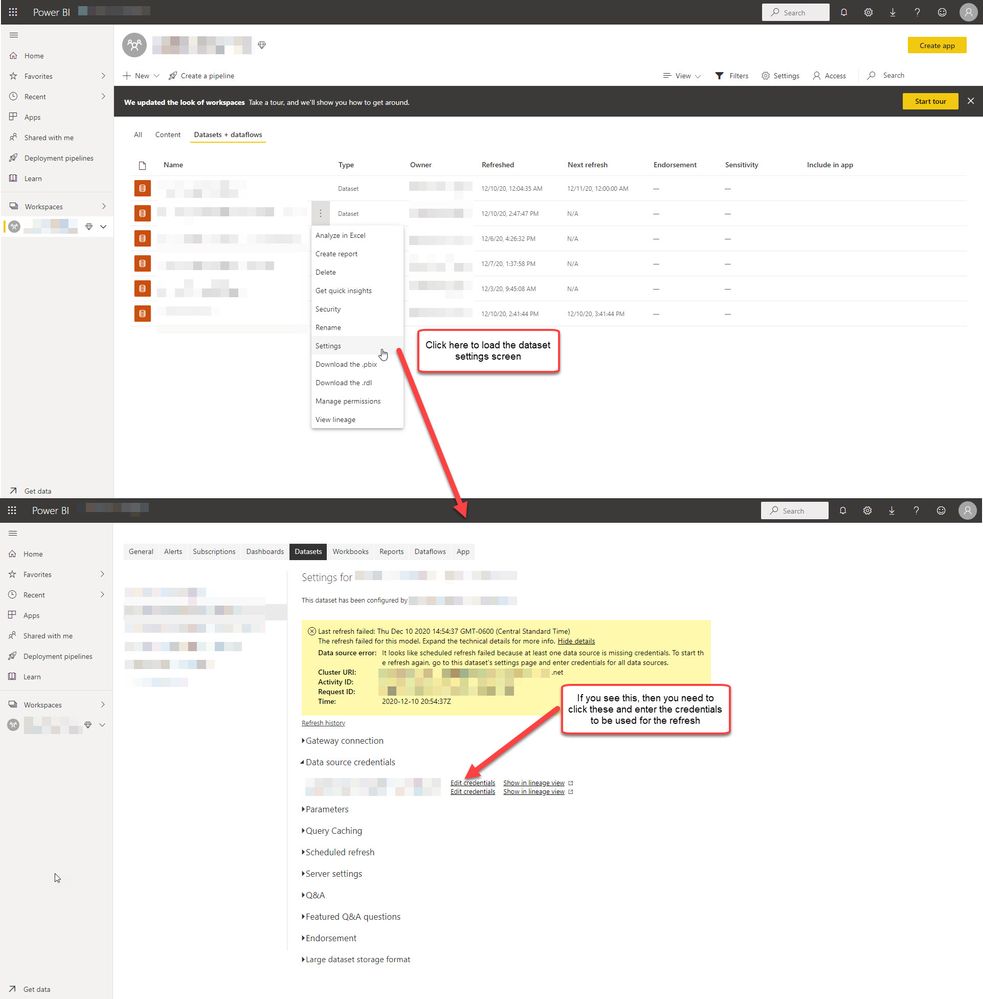
For anybody else that runs into this issue, here is a visual guide on where to enter the credential information to eliminate this error.


EnterRefreshCredentials.jpg

XiaodongLiang
Regular Visitor

I figured out myself. It is because the Cosmos key was input with desktop PowerBI only. While Refresh API will take advantage of PowerBI on-line (https://app.powerbi.com/),  which has not key input. After providing it, Refresh API started to run, though not sure it can succeed finally. Will see

Helpful resources

Announcements
New to Fabric survey Carousel

New to Fabric Survey

If you have recently started exploring Fabric, we'd love to hear how it's going. Your feedback can help with product improvements.

Power BI DataViz World Championships carousel

Power BI DataViz World Championships - June 2026

A new Power BI DataViz World Championship is coming this June! Don't miss out on submitting your entry.

Join our Fabric User Panel

Join our Fabric User Panel

Share feedback directly with Fabric product managers, participate in targeted research studies and influence the Fabric roadmap.

March Power BI Update Carousel

Power BI Community Update - March 2026

Check out the March 2026 Power BI update to learn about new features.