cancel
Showing results for 
Search instead for 
Did you mean: 

The Power BI Data Visualization World Championships is back! Get ahead of the game and start preparing now! Learn more

Reply
datanewbie
New Member

Line and Clustered Column Chart Assistance

Hello, I am working on creating a line and clustered column chart for custom service rankings by month and site.


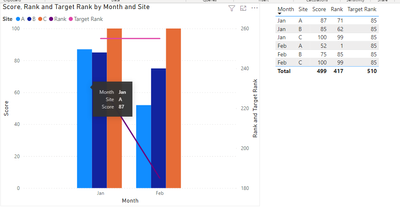
The problem I run into is the columns only allow me to select the "count" of the number of rankings, average, median etc... however, in the data I imported (see example below), I already have the values I want for rankings and score. However, the chart is averaging the rankings and score OR counting the number of distinct values I have. How can I get the chart to display exactly the values I have in the chart I imported?


Is it also possible to add a second line for a target rank?  

SiteMonthScoreRankTarget Rank
A

Jan

877185
BJan856285
CJan1009985
AFeb52185
BFeb758585
CFeb1009985


Thank you in advance!

2 REPLIES 2
v-chenwuz-msft
Community Support
Community Support

Hi @datanewbie ,


Yes, even though it is sum or average, as long as your you put site and month into chart. chart will show the numbers you imported. The common way to get the imported value in power bi is max().

vchenwuzmsft_0-1664523765886.png


Best Regards

Community Support Team _ chenwu zhu


If this post helps, then please consider Accept it as the solution to help the other members find it more quickly.

Thank you for your help. I was able to get the imported value by using max ( ). However, on the x-value I want the months in chronological order but I noticed for the values where I use the slicer for certain locations if February values are greater than January, it flips the order of the months on the x-axis. How can I overcome this?


datanewbie_0-1664550372344.png


Helpful resources

Announcements
Power BI DataViz World Championships

Power BI Dataviz World Championships

The Power BI Data Visualization World Championships is back! Get ahead of the game and start preparing now!

December 2025 Power BI Update Carousel

Power BI Monthly Update - December 2025

Check out the December 2025 Power BI Holiday Recap!

FabCon Atlanta 2026 carousel

FabCon Atlanta 2026

Join us at FabCon Atlanta, March 16-20, for the ultimate Fabric, Power BI, AI and SQL community-led event. Save $200 with code FABCOMM.