cancel
Showing results for 
Search instead for 
Did you mean: 

July 7 - July 17 | Round 2 of the Power BI Dataviz World Championships. Don't miss your chance! Learn more

Reply
angelflight
Frequent Visitor

Issue implementing a context menu

I am trying to add a context menu to my visual, and I'm using the example provided here:


https://github.com/microsoft/PowerBI-visuals/blob/gh-pages/tutorials/building-bar-chart/adding-conte...


 svg.on('contextmenu', () => {
const mouseEvent: MouseEvent = d3.event as MouseEvent;
const eventTarget: EventTarget = mouseEvent.target;
let dataPoint = d3.select(eventTarget).datum();
this.selectionManager.showContextMenu(dataPoint ? dataPoint.selectionId : {}, {
x: mouseEvent.clientX,
y: mouseEvent.clientY
});
mouseEvent.preventDefault();
});

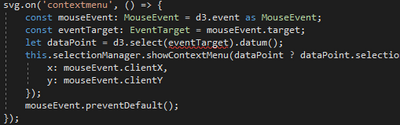
I am getting this error referring to the use of eventTarget in the d3.select:
 

angelflight_0-1599785229322.png


 TS2769: No overload matches this call.
Overload 1 of 2, '(selector: string): Selection<BaseType, unknown, HTMLElement, any>', gave the following error.
Argument of type 'EventTarget' is not assignable to parameter of type 'string'.
Overload 2 of 2, '(node: BaseType): Selection<BaseType, unknown, null, undefined>', gave the following error.
Argument of type 'EventTarget' is not assignable to parameter of type 'BaseType'.
Type 'EventTarget' is missing the following properties from type 'Window': applicationCache, clientInformation, closed, customElements, and 221 more. 

'

Any help/guidance would be appreciated....


Thanks,


Stephan

3 REPLIES 3
dm-p
Super User
Super User

Hi @angelflight,

Try casting your eventTarget to d3.BaseType, e.g.:

let dataPoint = d3.select(<d3.BaseType>eventTarget).datum();

Here's the pointer to a working example in one of my visuals for context.

Regards,

Daniel


Did I answer your question? Mark my post as a solution!

Proud to be a Super User!


On how to ask a technical question, if you really want an answer (courtesy of SQLBI)


Thank you @dm-p and @Greg_Deckler for your suggestions. Neither quite worked for me. Pardon my lack of experience, but EventTarget does not appear to have any attributes, leading me to think one needs to use that reference in some selector to get at the attributes. Setting the type like this let dataPoint = d3.select(<d3.BaseType>eventTarget).datum(); worked somewhat, but then dataPoint did not have a selectionId attribute. Seems like d3.select wants the selector to be a string. Ultimately, I solved the problem by cheating. Since I only want one context menu to appear no matter where the user clicks, I hard-coded the reference:


svg.on('contextmenu', () => {
const mouseEvent: MouseEvent = d3.event as MouseEvent;
let dataPoint: any = d3.select("svg").datum();
this.selectionManager.showContextMenu(dataPoint ? dataPoint.selectionId : {}, {
x: mouseEvent.clientX,
y: mouseEvent.clientY
});
mouseEvent.preventDefault();
});


Thanks again for your help!

Greg_Deckler
Community Champion
Community Champion

@angelflight  If I am reading that right, it's a type mistmatch situation. eventTarget is an EventTarget object and not a string. My guess is that you need to access an attribute of eventTarget like eventTarget.attribute ?


Follow on LinkedIn
@ me in replies or I'll lose your thread!!!
Instead of a Kudo, please vote for this idea
Become an expert!: Enterprise DNA
External Tools: MSHGQM
YouTube Channel!: Microsoft Hates Greg
Latest book!:
DAX For Humans

DAX is easy, CALCULATE makes DAX hard...

Helpful resources

Announcements
FabCon and SQLCon Barcelona 2026

FabCon & SQLCon – Barcelona 2026

Join us in Barcelona for FabCon and SQLCon, the Fabric, Power BI, SQL, and AI community event. Save €200 with code FABCMTY200.

60 days of Data Days Carousel

Data Days 2026

Join Fabric Data Days 2026: 60 days of free live/on-demand sessions, challenges, study groups, and certification opportunities.

Power BI DataViz World Championships carousel

Power BI DataViz World Championships - June 2026

A new Power BI DataViz World Championship is coming this June! Don't miss out on submitting your entry.

Top Solution Authors