
Join us at FabCon Atlanta from March 16 - 20, 2026, for the ultimate Fabric, Power BI, AI and SQL community-led event. Save $200 with code FABCOMM.
Register now!Get Fabric certified for FREE! Don't miss your chance! Learn more
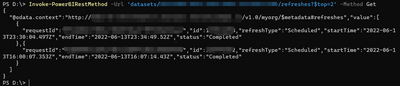
I am trying to use the following GET refreshes method (using Invoke-PowerBIRestMethod Powershell cmdlet) to retrieve refresh history on a particular dataset. I'm wanting to use the {$top} parameter (as mentioned in this PBI documentation) to return the top 1 refresh history however when I run this I get 40+ refresh instances.
I am using this URL:
GET https://api.powerbi.com/v1.0/myorg/datasets/{datasetId}/refreshes?$top=1
I'm thinking this is a bug unless I'm just missing something. Anyone else experiencing this? Again - the api returns refresh history but it does not limit the responses like its supposed to.
Solved! Go to Solution.
Hi @charlieswing , I found the solution; it is not a Power BI bug. The problem is when you add a $ in text using PowerShell it is interpreted as a variable; in other words, you have to escape the $ with `
$workspace_id = "your_workspace_id"
$dataset_id = "your_dataset_id"
$url_refresh_history = "https://api.powerbi.com/v1.0/myorg/groups/"+$workspace_id+"/datasets/"+$dataset_id+"/refreshes?`$top=2"
Hi @charlieswing , I found the solution; it is not a Power BI bug. The problem is when you add a $ in text using PowerShell it is interpreted as a variable; in other words, you have to escape the $ with `
$workspace_id = "your_workspace_id"
$dataset_id = "your_dataset_id"
$url_refresh_history = "https://api.powerbi.com/v1.0/myorg/groups/"+$workspace_id+"/datasets/"+$dataset_id+"/refreshes?`$top=2"
@Anonymous Is this an answer? You only posted a URL that I am already using.
Yes, I have tested it and there is no problem
Share feedback directly with Fabric product managers, participate in targeted research studies and influence the Fabric roadmap.
Check out the January 2026 Power BI update to learn about new features.
| User | Count |
|---|---|
| 3 | |
| 2 | |
| 2 | |
| 1 | |
| 1 |
| User | Count |
|---|---|
| 5 | |
| 4 | |
| 3 | |
| 3 | |
| 2 |