This time we’re going bigger than ever. Fabric, Power BI, SQL, AI and more. We're covering it all. You won't want to miss it.
Learn moreDid you hear? There's a new SQL AI Developer certification (DP-800). Start preparing now and be one of the first to get certified. Register now
Greetings all, thank you in advance for reading this and more so if you can assist!
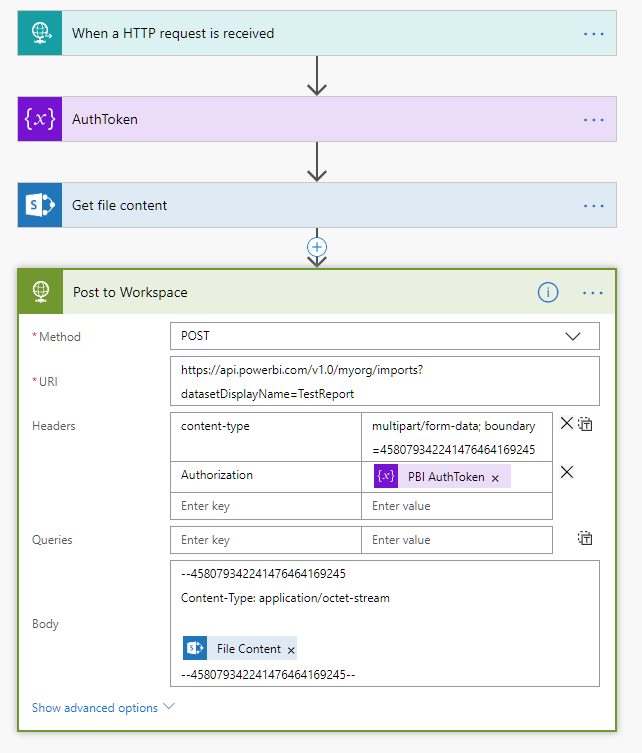
I am attempting to use Flow to retrieve a .pbix file from a bitbucket repository and import it to a workspace. To simplify the problem I've created this flow to illustrate the issue, simply pulling the .pbix from Sharepoint:
I'm nearly there but am getting an error from PBI Service when posting to the workspace. When I search for this error I get zero hits. Makes me feel lonely 😉
{
"error": {
"code": "MultiPartMimeStreamFormatException",
"pbi.error": {
"code": "MultiPartMimeStreamFormatException",
"parameters": {},
"details": [],
"exceptionCulprit": 1
}
}
}Any guidance is much appreciated, thanks!
Hi,
Did you solve this issue ?
I am trying to do something similar and I can't find the solution.
Thanks
Hi all,
I submitted this to the pbi community as well, trying to get some insights.
You can read the response here: https://community.powerbi.com/t5/Issues/PBI-REST-API-Import-PBIX-from-OneDrive-for-Business/idc-p/61...
Essentially MS is changing their documentation to fit reality: you can only import .xlsx files from OneDrive for Business, not .pbix files.
Still working for some solution…
Thanks for your answer. So I guess it does not work either with sharepoint online.
Do you know if it is possible to import .pbix files from another source using the API and flow ?
Check out the April 2026 Power BI update to learn about new features.
Sign up to receive a private message when registration opens and key events begin.
If you have recently started exploring Fabric, we'd love to hear how it's going. Your feedback can help with product improvements.
| User | Count |
|---|---|
| 4 | |
| 2 | |
| 1 | |
| 1 | |
| 1 |