This time we’re going bigger than ever. Fabric, Power BI, SQL, AI and more. We're covering it all. You won't want to miss it.
Learn moreDid you hear? There's a new SQL AI Developer certification (DP-800). Start preparing now and be one of the first to get certified. Register now
Greetings all, thank you in advance for reading this and more so if you can assist!
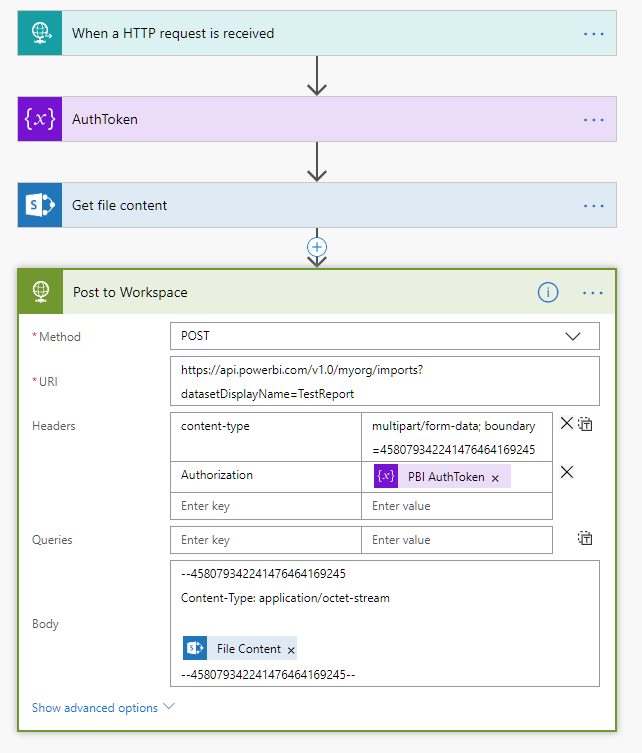
I am attempting to use Flow to retrieve a .pbix file from a bitbucket repository and import it to a workspace. To simplify the problem I've created this flow to illustrate the issue, simply pulling the .pbix from Sharepoint:
I'm nearly there but am getting an error from PBI Service when posting to the workspace. When I search for this error I get zero hits. Makes me feel lonely 😉
{
"error": {
"code": "MultiPartMimeStreamFormatException",
"pbi.error": {
"code": "MultiPartMimeStreamFormatException",
"parameters": {},
"details": [],
"exceptionCulprit": 1
}
}
}Any guidance is much appreciated, thanks!
Hi,
Did you solve this issue ?
I am trying to do something similar and I can't find the solution.
Thanks
Hi all,
I submitted this to the pbi community as well, trying to get some insights.
You can read the response here: https://community.powerbi.com/t5/Issues/PBI-REST-API-Import-PBIX-from-OneDrive-for-Business/idc-p/61...
Essentially MS is changing their documentation to fit reality: you can only import .xlsx files from OneDrive for Business, not .pbix files.
Still working for some solution…
Thanks for your answer. So I guess it does not work either with sharepoint online.
Do you know if it is possible to import .pbix files from another source using the API and flow ?
Check out the April 2026 Power BI update to learn about new features.
If you have recently started exploring Fabric, we'd love to hear how it's going. Your feedback can help with product improvements.
A new Power BI DataViz World Championship is coming this June! Don't miss out on submitting your entry.
| User | Count |
|---|---|
| 4 | |
| 2 | |
| 1 | |
| 1 | |
| 1 |