This time we’re going bigger than ever. Fabric, Power BI, SQL, AI and more. We're covering it all. You won't want to miss it.
Learn moreLevel up your Power BI skills this month - build one visual each week and tell better stories with data! Get started
Dear community,
I'm trying to generate an authorization token to Power BI Service in R. Thanks to Tom Martens there is his experience mentioned in this topic - https://community.powerbi.com/t5/Service/connect-to-Power-BI-Service-using-R/m-p/119697#M18632
When I tried, it was unsuccessful. Can somebody help to find out what is wrong in below R script?
library("httr");
library("httpuv")
#
#oauth_endpoints("azure")
powerbi.urls <- oauth_endpoint(
"authorize",
"token",
base_url = "https://login.windows.net/common/oauth2")
powerbi.app <- oauth_app(
"myAppName",
key="my_client_id-value",
secret="my_secret_id-value"
)
powerbi.token <- oauth2.0_token(powerbi.urls, powerbi.app,
user_params = list(resource = "https://analysis.windows.net/powerbi/api"),
use_oob = FALSE)Regards,
Ruslan
Hi @zoloturu,
Could you please mark the proper answer as a solution?
Best Regards,
Dale
Hi Dale @v-jiascu-msft,
I didn't receive any solution so far. I tried to add localhost in Azure portal to app registrations as you told, but it didn't help. I opened a MS ticket for that. You can check it with number 118071418582124.
Regards,
Ruslan
Hi Ruslan,
What's the error message?
I added a parameter to "oauth_endpoint". It worked. Please give it a try.
library("httr");
library("httpuv")
#
#oauth_endpoints("azure")
powerbi.urls <- oauth_endpoint(
NULL,
"authorize",
"token",
base_url = "https://login.windows.net/common/oauth2")
powerbi.app <- oauth_app(
"myAppName",
key="my_client_id-value",
secret="my_secret_id-value"
)
powerbi.token <- oauth2.0_token(powerbi.urls, powerbi.app,
user_params = list(resource = "https://analysis.windows.net/powerbi/api"),
use_oob = FALSE)

Best Regards,
Dale
Hi Dale @v-jiascu-msft,
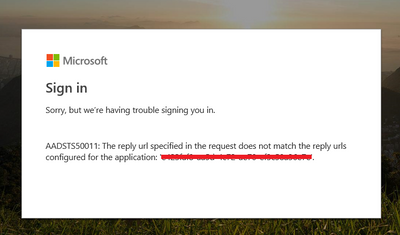
I've tried with your addition. But error persists. See it below:
browser error
Regards,
Ruslan
Hi Ruslan,
As we can see from the error message, it seem the redirect URL isn't the same between your settings and the Azure settings. Please refer to the snapshot below and check out.
Best Regards,
Dale
Check out the April 2026 Power BI update to learn about new features.
Sign up to receive a private message when registration opens and key events begin.
If you have recently started exploring Fabric, we'd love to hear how it's going. Your feedback can help with product improvements.
| User | Count |
|---|---|
| 4 | |
| 2 | |
| 1 | |
| 1 | |
| 1 |
| User | Count |
|---|---|
| 10 | |
| 8 | |
| 3 | |
| 3 | |
| 2 |