Hello everyone,
I'm trying to create a custom visual based on D3's Visavail, the linked example defines two datasets: catagories and data:
var dataset = [{
    "measure": "Fat Bike",
    "categories": { // category names and their colors defined here
        "Kim": { "color": "#377eb8" },
        "Bert": { "color": "#ff7f00" },
        "Zoe": { "color": "purple" },
        },
    "data": [
        ["2016-01-01 12:00:00", "Kim", "2016-01-01 13:00:00"],
        ["2016-01-01 14:22:51", "Zoe", "2016-01-01 16:14:12"],
        ["2016-01-01 16:14:12", "Bert", "2016-01-01 17:14:12"],
        ["2016-01-01 19:20:05", "Zoe", "2016-01-01 20:30:00"]
    ]
}];
Question:
how do I define two different tables in my dataViewMappings, one for the categories and one for the data?
Dataroles:
Here is a screenshot of my data, the chart is succesfully created with pre-defined data.
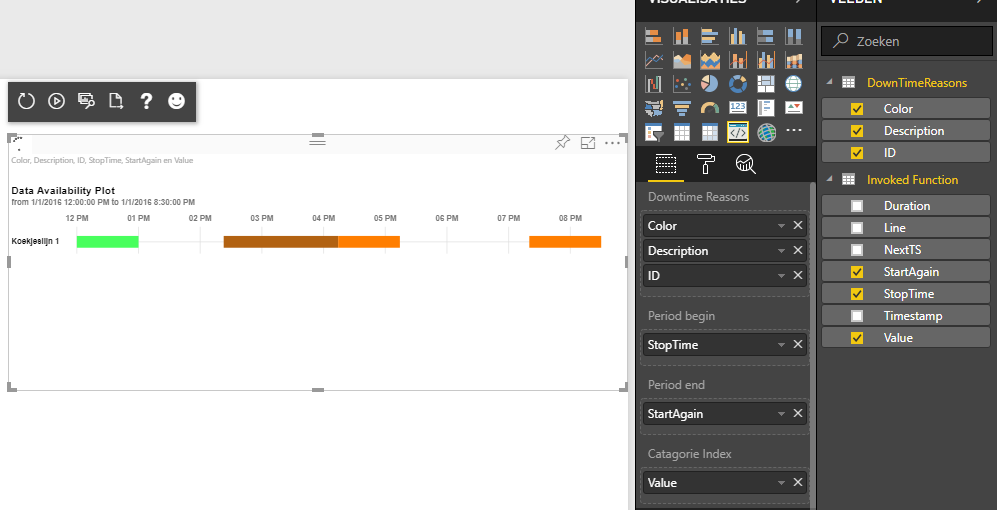
DataViewMapping:
Why is the datamapping below not creating two tables?
    "dataViewMappings": [
        {
	    "conditions":[
	     {
		"DownTimes":{
		     "max": 3
		}
	     }
	     ],
            "table": {
                "rows": {
                    "for": {  "in": "DownTimes"  }
                }
            }
        },
        {
            "conditions":[
                {
                    "Begin":{
                        "max": 1
                    },
                    "End":{
                        "max": 1
                    },
                    "RedenIndex":{
                        "max": 1
                    }
                }
            ],
            "table": {
                "rows": {
                    "select":[
                        {"for": {  "in": "Begin"  }},
                        {"for": {  "in": "End"  }},
                        {"for": {  "in": "RedenIndex"  }}
                    ]
                }
            }
        }
    ]
I included the total project folder: Here (zip)


