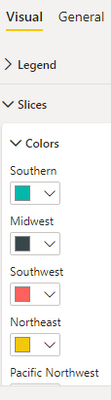
Hi @SriThiru,
It's hard to provide a targeted answer without knowing your choice of data view mapping and view model, but the high-level approach to this is that:
- You create a 'template' property (or properties) within the object in capabilities.json for the property that you wish to bind to your data. This has the structure and typing that the main window needs to know about when the visual is initialised, as you cannot dynamically manipulate the capabilities post-initialisation.
- When you process your dataset, you assign a selector (reconciling the data point's grouping) to the attribute that you wish to bind to the properties pane. Selectors are not just used for interactivity and are the way of bridging your view model to the original data view that Power BI sends through.
- When enumerating your settings (enumerateObjectInstances), you use the knowledge of your data to push additional object instances that reference the template property (or properties) for each selector.
How to do this will very much depend on how you are intending to structure your data within the visual, and whether it is possible to retain the correct context against the data view that is sent to the visual by Power BI.
The easiest way to have a look and play with a working example would be to go through the sample bar chart visual and see what's being done to achieve the solution there. Specific points of interest in this codebase are:
- Template property
- How the selector is assigned when processing the view model (and how color is retrieved from properties)
- How the dynamic properties are added to the object when settings are enumerated
Here's an additional post where the author has a correct setup and shows these three in context (but the problem was actually something else).
Hopefully this should help you get a little further. Good luck!
Daniel