cancel
Showing results for 
Search instead for 
Did you mean: 

Try your skills in the Power BI Dataviz World Championship! Round one ends June 26. Join now

Reply
paynemiller
Regular Visitor

How does one retrieve values from Matrix dataMapping

I am having trouble retrieving the actual values from a matrix data mapping. Below is the current mapping I have specified:

"dataViewMappings": [
{
"matrix": {
"rows": {
"select": [
{
"for": {
"in": "row"
}
}
]
},
"columns": {
"for": {
"in": "column"
}
},
"values": {
"for": {
"in": "values"
}
}
}
}
]

When I attempt to access my valueSources via

dataViews[0].matrix.valueSources[0]

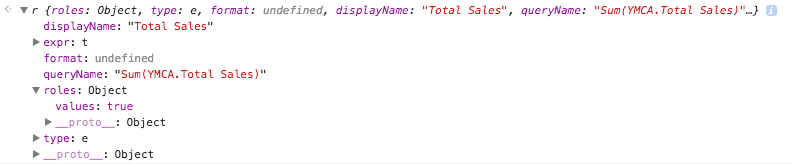
All my object contains is the following:

Screen Shot 2017-08-02 at 9.43.53 AM.png


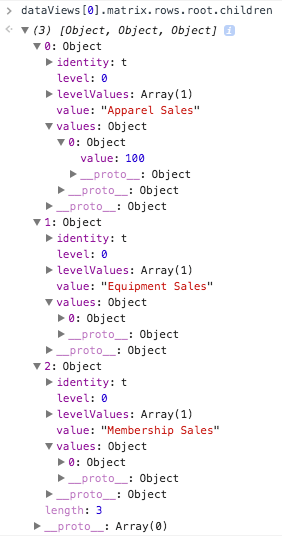
However, I do notice that there is a root object on both the rows and columns that contains the values I want (see below)


Screen Shot 2017-08-02 at 9.48.39 AM.png


So, my question is: how do I access the values of the matrix, my actual measures?


1 ACCEPTED SOLUTION
paynemiller
Regular Visitor

I actually found the answer to my question! I wanted to post here so other developers who experience this can find help to. You access the root and values via: 


 matrix.rows.root.children[0].values[0].value


Cheers! 

View solution in original post

1 REPLY 1
paynemiller
Regular Visitor

I actually found the answer to my question! I wanted to post here so other developers who experience this can find help to. You access the root and values via: 


 matrix.rows.root.children[0].values[0].value


Cheers! 

Helpful resources

Announcements
Fabric Data Days is here Carousel

Fabric Data Days 2026

Don't miss out on Data Days, June 15 through August 7. Learn Fabric, Power BI, SQL, AI and more.

Power BI DataViz World Championships carousel

Power BI DataViz World Championships - June 2026

A new Power BI DataViz World Championship is coming this June! Don't miss out on submitting your entry.