cancel
Showing results for 
Search instead for 
Did you mean: 

Join the FabCon + SQLCon recap series. Up next: Power BI, Real-Time Intelligence, IQ and AI, and Data Factory take center stage. All sessions are available on-demand after the live show. Register now

Reply
murali_r
Helper I
Helper I

How do we refresh dataset frequently from datasource?

Once data got updated in database, I want to update it in my power BI report as well instantly. Please help me to acheive this.

7 REPLIES 7
Eric_Zhang
Microsoft Employee
Microsoft Employee


@murali_r wrote:

Once data got updated in database, I want to update it in my power BI report as well instantly. Please help me to acheive this.


@murali_r


On refresh&real time data aspect, you can reference

@Eric_Zhang


Thanks for updates,

with use of your information I can update dataset , but it is not reflected in report automatically where it is viewed . Once reload/refresh the report then only got update. I need whenever the data got updated , it should reflected in UI automatically without reload/refresh page or report. Please update some idea to acheive this.

Hi @murali_r


Did you try using Direct Query? See this link: https://docs.microsoft.com/en-us/power-bi/desktop-use-directquery

It must show information always uptaded. If you want to use Import, you must see the information after the the gateway information changes it status to completed. See this: https://docs.microsoft.com/en-us/power-bi/service-gateway-onprem-faq


Hope it works for you.

@Juramirez


Yes I am using direct query in my report . But no luck.  If any data updated in database table that is not reflected in my report until I refreshed the report. I am getting same issue . I don't know if any configuration need to do in this report. Please help me for this or provide the some other way to acheive this.

@murali_r


Did you try testing in your Power BI Desktop or in the Embedded one? Maybe is something wrong with your datasource. You have set your gateway correctly? It is working? Please provide images or info to see this (remeber to post this with mock data)


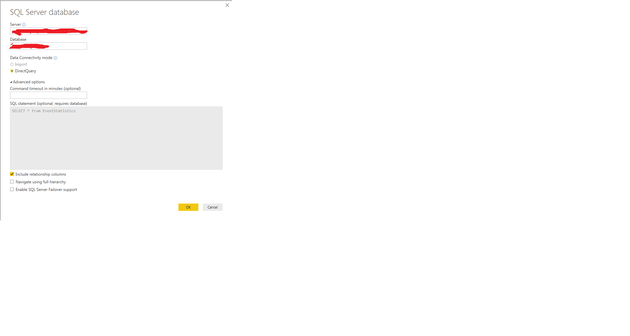
 I am trying testing in embeded one . the following screen sort shows my azure datasource connection details. 


 DataSourceConnection.png

Please update if anything wrong.

Juramirez
Resolver I
Resolver I

Helpful resources

Announcements
April Power BI Update Carousel

Power BI Monthly Update - April 2026

Check out the April 2026 Power BI update to learn about new features.

New to Fabric survey Carousel

New to Fabric Survey

If you have recently started exploring Fabric, we'd love to hear how it's going. Your feedback can help with product improvements.

Power BI DataViz World Championships carousel

Power BI DataViz World Championships - June 2026

A new Power BI DataViz World Championship is coming this June! Don't miss out on submitting your entry.

FabCon and SQLCon Highlights Carousel

FabCon &SQLCon Highlights

Experience the highlights from FabCon & SQLCon, available live and on-demand starting April 14th.