cancel
Showing results for 
Search instead for 
Did you mean: 

We've captured the moments from FabCon & SQLCon that everyone is talking about, and we are bringing them to the community, live and on-demand. Starts on April 14th. Register now

Reply
amitloh
Regular Visitor

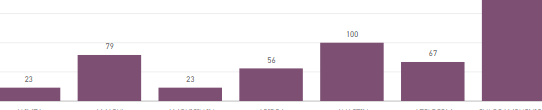
How do I use vertical orientation

How do I use vertical orientationUntitled.png

1 ACCEPTED SOLUTION
MawashiKid
Resolver II
Resolver II

Hi,

I don't have access to source code which was used to create your barchart visual.

Now I may be wrong... though I can assume this type of barchart may have been built using d3.js

coding approach. Actually a lot of visuals found Custom Visual Gallery were basically built using

a d3.js coding approach including the main barChart tutorial found on Github.

So I'd say that pretty often label orientation can be dealt with transform rotate attribute.

As an example  the following code with x-axis label 

 svg.append("g")
                .attr("class", "x axis")
                .attr("transform", "translate(0," + height + ")")
                .call(xAxis)
                .selectAll("text")
                .style("text-anchor", "end")
                .attr("dx", "-.8em")
                .attr("dy", "-.55em")
                .attr("transform", "rotate(-90)" ); //<---- 90 angle rotation

would produce something similar to this
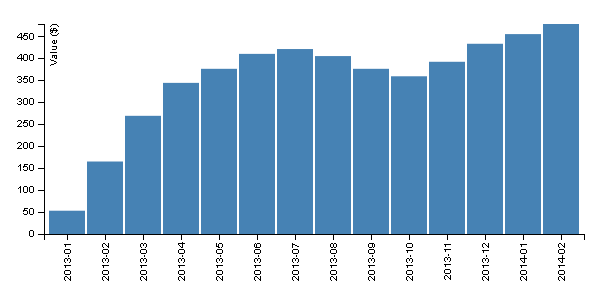
Rotate90.png
while the same code with only minor rotate parameter modification:

svg.append("g")
                .attr("class", "x axis")
                .attr("transform", "translate(0," + height + ")")
                .call(xAxis)
                .selectAll("text")
                .style("text-anchor", "end")
                .attr("dx", "-.8em")
                .attr("dy", "-.55em")
                .attr("transform", "rotate(-45)" ); //<-- 45 angle rotation

would render something similar to this:
Rotate45.png
Note that this is pretty basic d3.js stuff... if you can send a copy of the source code you're using
then  I maybe I could take a closer look at it and come up with something more accurate...


Hope this helps


View solution in original post

4 REPLIES 4
MawashiKid
Resolver II
Resolver II

Hi,

I don't have access to source code which was used to create your barchart visual.

Now I may be wrong... though I can assume this type of barchart may have been built using d3.js

coding approach. Actually a lot of visuals found Custom Visual Gallery were basically built using

a d3.js coding approach including the main barChart tutorial found on Github.

So I'd say that pretty often label orientation can be dealt with transform rotate attribute.

As an example  the following code with x-axis label 

 svg.append("g")
                .attr("class", "x axis")
                .attr("transform", "translate(0," + height + ")")
                .call(xAxis)
                .selectAll("text")
                .style("text-anchor", "end")
                .attr("dx", "-.8em")
                .attr("dy", "-.55em")
                .attr("transform", "rotate(-90)" ); //<---- 90 angle rotation

would produce something similar to this
Rotate90.png
while the same code with only minor rotate parameter modification:

svg.append("g")
                .attr("class", "x axis")
                .attr("transform", "translate(0," + height + ")")
                .call(xAxis)
                .selectAll("text")
                .style("text-anchor", "end")
                .attr("dx", "-.8em")
                .attr("dy", "-.55em")
                .attr("transform", "rotate(-45)" ); //<-- 45 angle rotation

would render something similar to this:
Rotate45.png
Note that this is pretty basic d3.js stuff... if you can send a copy of the source code you're using
then  I maybe I could take a closer look at it and come up with something more accurate...


Hope this helps


Hi, 


I was searching for the same subject and found your suggestion. 

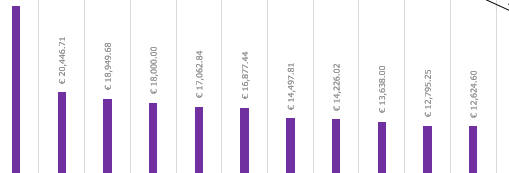
I am using Power Bi default visual (Clustered Column Chart) and willing to accomplish rotating the X axis. 

Where do I apply the code you shared? 

amitloh
Regular Visitor

mine shows like this-

Untitled.png

Reid_Havens
Most Valuable Professional

Hi @amitloh,


Formatting features for things such as data labels are still very much in their infancy in Power BI. If you think it would be a good feature addition please add it as an idea on the PowerBI Ideas page. There is another post with a reponse from Matt Ellington (MVP and super contributor) that gives a similar repsonse here as wel..

Helpful resources

Announcements
New to Fabric survey Carousel

New to Fabric Survey

If you have recently started exploring Fabric, we'd love to hear how it's going. Your feedback can help with product improvements.

Power BI DataViz World Championships carousel

Power BI DataViz World Championships - June 2026

A new Power BI DataViz World Championship is coming this June! Don't miss out on submitting your entry.

Join our Fabric User Panel

Join our Fabric User Panel

Share feedback directly with Fabric product managers, participate in targeted research studies and influence the Fabric roadmap.

March Power BI Update Carousel

Power BI Community Update - March 2026

Check out the March 2026 Power BI update to learn about new features.