
cancel
Showing results for 
Search instead for 
Did you mean: 

Get Fabric certified for FREE! Don't miss your chance! Learn more

Reply
Daryn-TP
Regular Visitor

How do I group a matrix by Values?

I have a table similar to the following table built in PBI. There are 4 metrics and they are compared accross 3 dates.

DarynTP_0-1653069049214.png

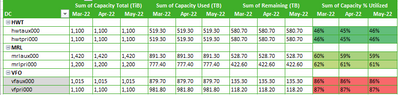
however I want to group it like so (which i put together in excel). How do I get the matrix in pbi to group metrics like I have in excel?

DarynTP_1-1653069125789.png


1 ACCEPTED SOLUTION

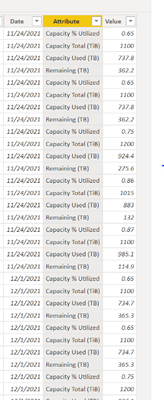
If you unpivot the value columns in the query editor, then you can use the resulting attribute column for your column headers.

AlexisOlson_0-1653320531287.png

Getting the formatting how you want it is a separate challenge.


View solution in original post

4 REPLIES 4
AlexisOlson
Super User
Super User

Can you provide a sample dataset? Depending on how your data is pivoted or unpivoted the solution could be rather different.

Here is a mock sample of the data set. 


DCLocationCapacity % UtilizedCapacity Used (TiB)Capacity Total (TiB)Capacity Used (TB)Capacity Total (TB)Remaining (TB)Date
HWThwtaux000        0.65734.001100.00734.001100.00366.0010/27/2021
HWThwtpri0000.65743.001100.00743.001100.00357.0010/27/2021
MRLmrlaux000 0.731040.001420.001040.001420.00380.0010/27/2021
MRLmrlpri000 0.75925.401200.00925.401200.00274.6010/27/2021
VFOvfaux0000.86883.101015.00883.101015.00131.9010/27/2021
VFOvfpri0000.87985.201100.00985.201100.00114.8010/27/2021
HWThwtaux000        0.65737.801100.00737.801100.00362.2011/24/2021
HWThwtpri0000.65737.801100.00737.801100.00362.2011/24/2021
MRLmrlaux000 0.731040.001420.001040.001420.00380.0011/24/2021
MRLmrlpri000 0.75924.401200.00924.401200.00275.6011/24/2021
VFOvfaux0000.86883.001015.00883.001015.00132.0011/24/2021
VFOvfpri0000.87985.101100.00985.101100.00114.9011/24/2021
HWThwtaux000        0.65737.001100.00737.001100.00363.0012/29/2021
HWThwtpri0000.65737.001100.00737.001100.00363.0012/29/2021
MRLmrlaux000 0.741060.001420.001060.001420.00360.0012/29/2021
MRLmrlpri000 0.75935.001200.00935.001200.00265.0012/29/2021
VFOvfaux0000.86879.701015.00879.701015.00135.3012/29/2021
VFOvfpri0000.87981.801100.00981.801100.00118.2012/29/2021

If you unpivot the value columns in the query editor, then you can use the resulting attribute column for your column headers.

AlexisOlson_0-1653320531287.png

Getting the formatting how you want it is a separate challenge.


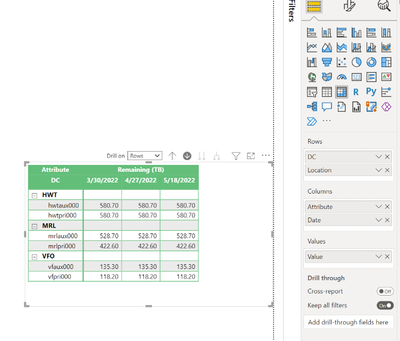
So I tried the solution you suggested however only one of the attributes is showing up. Any idea what I can do to make all the attributes show up?


DarynTP_0-1654091718093.png

DarynTP_1-1654091742819.png


Helpful resources

Announcements
Sticker Challenge 2026 Carousel

Join our Community Sticker Challenge 2026

If you love stickers, then you will definitely want to check out our Community Sticker Challenge!

January Power BI Update Carousel

Power BI Monthly Update - January 2026

Check out the January 2026 Power BI update to learn about new features.

FabCon Atlanta 2026 carousel

FabCon Atlanta 2026

Join us at FabCon Atlanta, March 16-20, for the ultimate Fabric, Power BI, AI and SQL community-led event. Save $200 with code FABCOMM.