
Join us at FabCon Atlanta from March 16 - 20, 2026, for the ultimate Fabric, Power BI, AI and SQL community-led event. Save $200 with code FABCOMM.
Register now!The Power BI Data Visualization World Championships is back! Get ahead of the game and start preparing now! Learn more
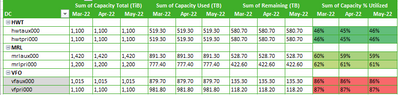
I have a table similar to the following table built in PBI. There are 4 metrics and they are compared accross 3 dates.
however I want to group it like so (which i put together in excel). How do I get the matrix in pbi to group metrics like I have in excel?
Solved! Go to Solution.
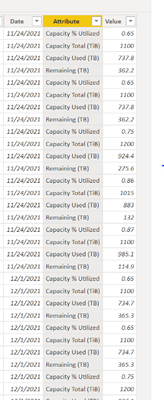
If you unpivot the value columns in the query editor, then you can use the resulting attribute column for your column headers.
Getting the formatting how you want it is a separate challenge.
Can you provide a sample dataset? Depending on how your data is pivoted or unpivoted the solution could be rather different.
Here is a mock sample of the data set.
| DC | Location | Capacity % Utilized | Capacity Used (TiB) | Capacity Total (TiB) | Capacity Used (TB) | Capacity Total (TB) | Remaining (TB) | Date |
| HWT | hwtaux000 | 0.65 | 734.00 | 1100.00 | 734.00 | 1100.00 | 366.00 | 10/27/2021 |
| HWT | hwtpri000 | 0.65 | 743.00 | 1100.00 | 743.00 | 1100.00 | 357.00 | 10/27/2021 |
| MRL | mrlaux000 | 0.73 | 1040.00 | 1420.00 | 1040.00 | 1420.00 | 380.00 | 10/27/2021 |
| MRL | mrlpri000 | 0.75 | 925.40 | 1200.00 | 925.40 | 1200.00 | 274.60 | 10/27/2021 |
| VFO | vfaux000 | 0.86 | 883.10 | 1015.00 | 883.10 | 1015.00 | 131.90 | 10/27/2021 |
| VFO | vfpri000 | 0.87 | 985.20 | 1100.00 | 985.20 | 1100.00 | 114.80 | 10/27/2021 |
| HWT | hwtaux000 | 0.65 | 737.80 | 1100.00 | 737.80 | 1100.00 | 362.20 | 11/24/2021 |
| HWT | hwtpri000 | 0.65 | 737.80 | 1100.00 | 737.80 | 1100.00 | 362.20 | 11/24/2021 |
| MRL | mrlaux000 | 0.73 | 1040.00 | 1420.00 | 1040.00 | 1420.00 | 380.00 | 11/24/2021 |
| MRL | mrlpri000 | 0.75 | 924.40 | 1200.00 | 924.40 | 1200.00 | 275.60 | 11/24/2021 |
| VFO | vfaux000 | 0.86 | 883.00 | 1015.00 | 883.00 | 1015.00 | 132.00 | 11/24/2021 |
| VFO | vfpri000 | 0.87 | 985.10 | 1100.00 | 985.10 | 1100.00 | 114.90 | 11/24/2021 |
| HWT | hwtaux000 | 0.65 | 737.00 | 1100.00 | 737.00 | 1100.00 | 363.00 | 12/29/2021 |
| HWT | hwtpri000 | 0.65 | 737.00 | 1100.00 | 737.00 | 1100.00 | 363.00 | 12/29/2021 |
| MRL | mrlaux000 | 0.74 | 1060.00 | 1420.00 | 1060.00 | 1420.00 | 360.00 | 12/29/2021 |
| MRL | mrlpri000 | 0.75 | 935.00 | 1200.00 | 935.00 | 1200.00 | 265.00 | 12/29/2021 |
| VFO | vfaux000 | 0.86 | 879.70 | 1015.00 | 879.70 | 1015.00 | 135.30 | 12/29/2021 |
| VFO | vfpri000 | 0.87 | 981.80 | 1100.00 | 981.80 | 1100.00 | 118.20 | 12/29/2021 |
If you unpivot the value columns in the query editor, then you can use the resulting attribute column for your column headers.
Getting the formatting how you want it is a separate challenge.
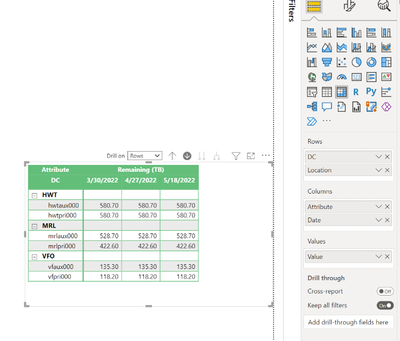
So I tried the solution you suggested however only one of the attributes is showing up. Any idea what I can do to make all the attributes show up?
The Power BI Data Visualization World Championships is back! Get ahead of the game and start preparing now!
| User | Count |
|---|---|
| 3 | |
| 2 | |
| 1 | |
| 1 | |
| 1 |
| User | Count |
|---|---|
| 11 | |
| 6 | |
| 4 | |
| 4 | |
| 3 |