cancel
Showing results for 
Search instead for 
Did you mean: 

Did you hear? There's a new SQL AI Developer certification (DP-800). Start preparing now and be one of the first to get certified. Register now

Reply
Anonymous
Not applicable

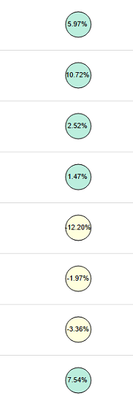
How can I create the below bubble chart

Bubble.png


4 REPLIES 4
giovanni_figuei
Frequent Visitor

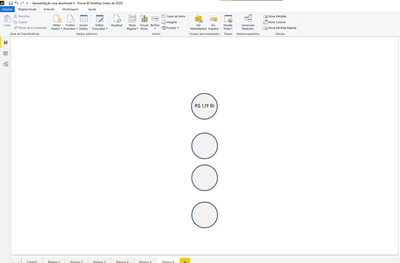
ive never seen this type of Chart but one option is to use Shapes and put cards inside with the respective information like this 
the circular shapes 

giovanni_figuei_0-1642614691379.png

The card without background inside the shape

giovanni_figuei_1-1642614761288.png

Anonymous
Not applicable

Thanks for responding @giovanni_figuei but this will be static and I want it to be dynamic so that if I change the dimensions the bubble should change as well. 

You can create this using python but im not an expert so i can't help you more than this soryy

Anonymous
Not applicable

Hi @Anonymous ,


I think you can try to embed SVG image in your visual by measure.

For reference:

Embedding SVG images in Power BI

SVG in Power BI – Part 1


Best Regards,
Rico Zhou


If this post helps, then please consider Accept it as the solution to help the other members find it more quickly.

Helpful resources

Announcements
April Power BI Update Carousel

Power BI Monthly Update - April 2026

Check out the April 2026 Power BI update to learn about new features.

New to Fabric survey Carousel

New to Fabric Survey

If you have recently started exploring Fabric, we'd love to hear how it's going. Your feedback can help with product improvements.

Power BI DataViz World Championships carousel

Power BI DataViz World Championships - June 2026

A new Power BI DataViz World Championship is coming this June! Don't miss out on submitting your entry.