cancel
Showing results for 
Search instead for 
Did you mean: 

The FabCon + SQLCon recap series starts April 14th at 8am Pacific. If you’re tracking where AI is going inside Fabric, this first session is a can't miss. Register now

Reply
Anonymous
Not applicable

Help with API refresh on Power BI Service

Hi All, 


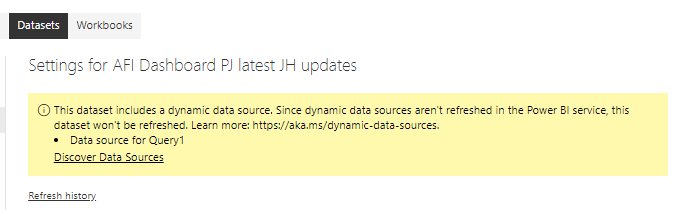
I've been given a Power BI file with an API connector that calls a JSON file. The problem is when I upload the file to Power BI Service it won't let me refresh. I get this error: 

image.png

How can I update the code to make sure it refreshes on Power BI service? 


Thanks in advance!


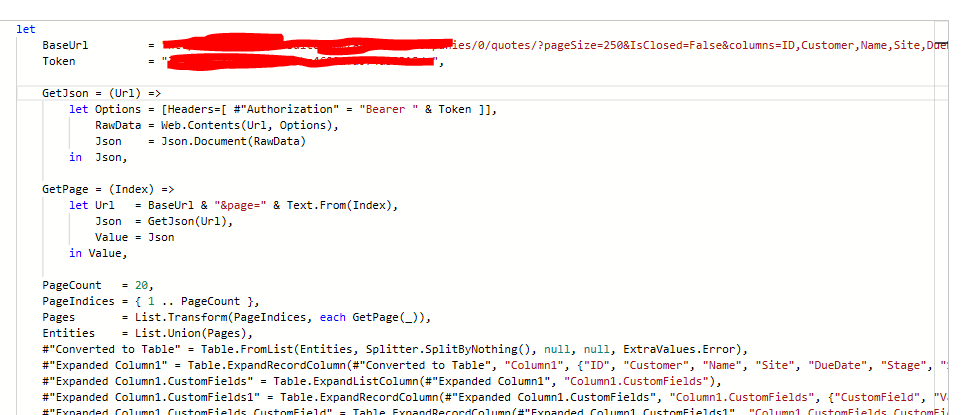
Here's the code for the data source: 


code.PNG


And the code in a text format: 


let 
    BaseUrl         = "URL",
    Token           = "TOKEN",
 
    GetJson = (Url) =>
        let Options = [Headers=[ #"Authorization" = "Bearer " & Token ]],
            RawData = Web.Contents(Url, Options),
            Json    = Json.Document(RawData)
        in  Json,
  
    GetPage = (Index) =>
        let Url   = BaseUrl & "&page=" & Text.From(Index),
            Json  = GetJson(Url),
            Value = Json
        in Value,

    PageCount   = 20,
    PageIndices = { 1 .. PageCount },
    Pages       = List.Transform(PageIndices, each GetPage(_)),
    Entities    = List.Union(Pages),
    #"Converted to Table" = Table.FromList(Entities, Splitter.SplitByNothing(), null, null, ExtraValues.Error),


1 REPLY 1
lbendlin
Super User
Super User

Your base URL may be too detailed. Follow this guidance to make it more generic


https://blog.crossjoin.co.uk/2016/08/23/web-contents-m-functions-and-dataset-refresh-errors-in-power...


Helpful resources

Announcements
New to Fabric survey Carousel

New to Fabric Survey

If you have recently started exploring Fabric, we'd love to hear how it's going. Your feedback can help with product improvements.

Power BI DataViz World Championships carousel

Power BI DataViz World Championships - June 2026

A new Power BI DataViz World Championship is coming this June! Don't miss out on submitting your entry.

Join our Fabric User Panel

Join our Fabric User Panel

Share feedback directly with Fabric product managers, participate in targeted research studies and influence the Fabric roadmap.

March Power BI Update Carousel

Power BI Community Update - March 2026

Check out the March 2026 Power BI update to learn about new features.