cancel
Showing results for 
Search instead for 
Did you mean: 

Data Days is here! Join us now for 60+ days of learning, challenges, and connection. Learn more

Reply
jaiswati
Regular Visitor

HTTP://api.powered.com


Hi 


Access was denied when I tried to open this in the browser

https://api.powerbi.com


So If i write a console app , to read the Datasets in  REST api , how will it work?


Swati

1 ACCEPTED SOLUTION
Eric_Zhang
Microsoft Employee
Microsoft Employee

@jaiswati

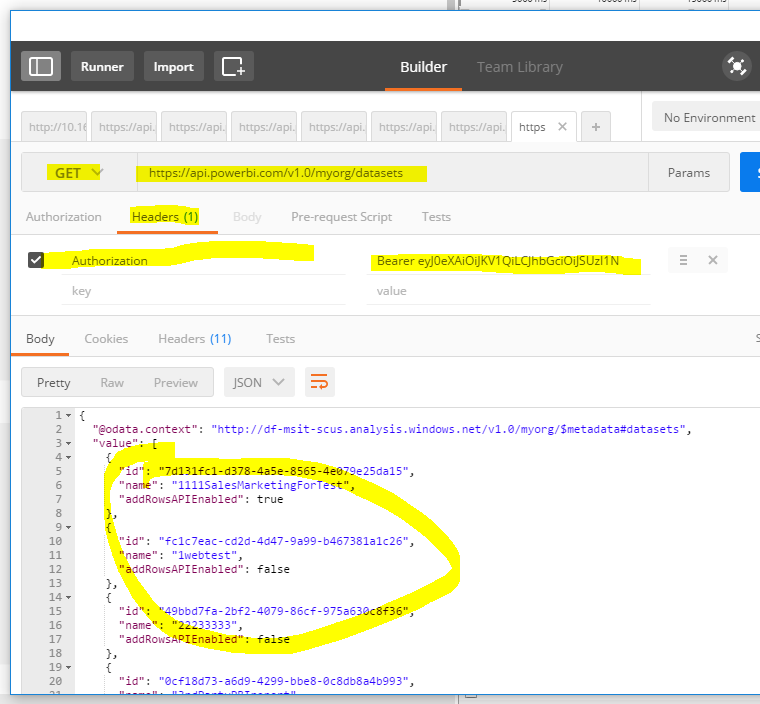
It requires an accessToken when trying to access the API link. To get the datasets, you can use this GET API.

You'll have to set the authentication in the request Header. This app in my test is POSTMAN.


Capture.PNG


To get an accessToken for testing purpose in a quick way, follow below steps.

1. Login in Power BI service.

2. Open Chome dev tool(F12), click on any network request and find a token.

Capture2.PNG


To get the accessToken in a console application, you can reference GetAccessToken function this sample .


View solution in original post

2 REPLIES 2
Eric_Zhang
Microsoft Employee
Microsoft Employee

@jaiswati

It requires an accessToken when trying to access the API link. To get the datasets, you can use this GET API.

You'll have to set the authentication in the request Header. This app in my test is POSTMAN.


Capture.PNG


To get an accessToken for testing purpose in a quick way, follow below steps.

1. Login in Power BI service.

2. Open Chome dev tool(F12), click on any network request and find a token.

Capture2.PNG


To get the accessToken in a console application, you can reference GetAccessToken function this sample .


Greg_Deckler
Community Champion
Community Champion

https://msdn.microsoft.com/en-US/library/mt186159.aspx


Follow on LinkedIn
@ me in replies or I'll lose your thread!!!
Instead of a Kudo, please vote for this idea
Become an expert!: Enterprise DNA
External Tools: MSHGQM
YouTube Channel!: Microsoft Hates Greg
Latest book!:
DAX For Humans

DAX is easy, CALCULATE makes DAX hard...

Helpful resources

Announcements
Fabric Data Days is here Carousel

Fabric Data Days 2026

Don't miss out on Data Days, June 15 through August 7. Learn Fabric, Power BI, SQL, AI and more.

May Power BI Update Carousel

Power BI Monthly Update - May 2026

Check out the May 2026 Power BI update to learn about new features.

Power BI DataViz World Championships carousel

Power BI DataViz World Championships - June 2026

A new Power BI DataViz World Championship is coming this June! Don't miss out on submitting your entry.

Top Kudoed Authors