cancel
Showing results for 
Search instead for 
Did you mean: 

Learn from the best! Meet the four finalists headed to the FINALS of the Power BI Dataviz World Championships! Register now

Reply
Anonymous
Not applicable

Get Activity Events API doesn't return activities when activities exist

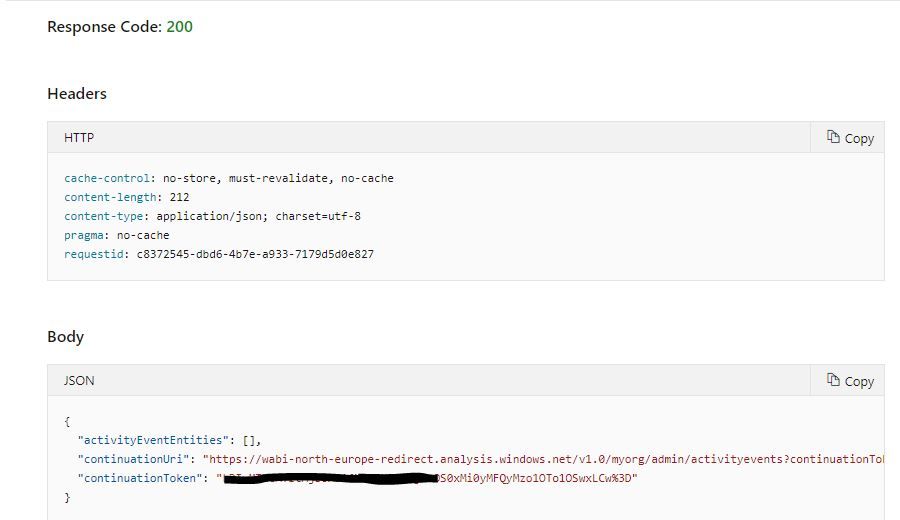
Admin API - Get Activity Events (GET https://api.powerbi.com/v1.0/myorg/admin/activityevents) doesn't return data when activity data exists in the audit log.


When using "Admin - Get Activity Events" API it doesn't return data for dates in past 90 days 

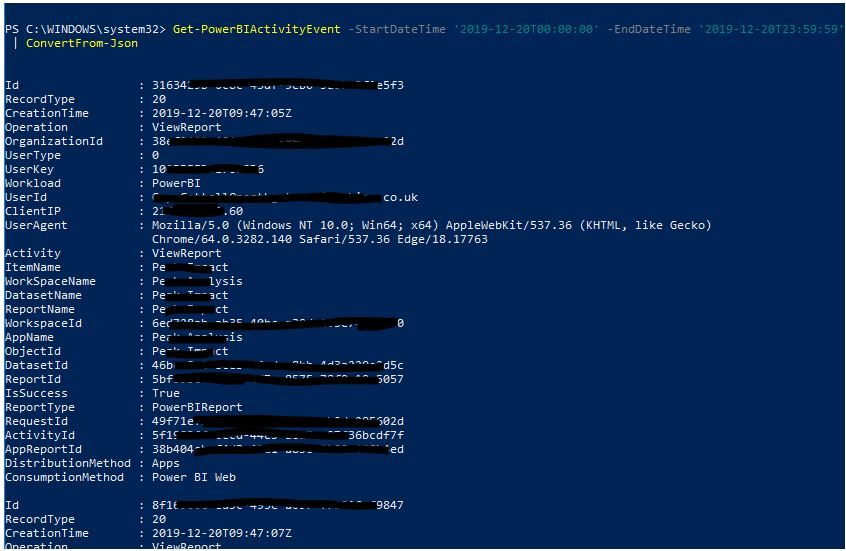
When using "Get-PowerBIActivityEvents" in Powershell results are returned correctly


Example (The same user has been used and is a Power BI Administrator):


Doesn't return data via API (https://docs.microsoft.com/en-us/rest/api/power-bi/admin/getactivityevents#code-try-0

PBIActivityEvents from API #1 (20200115).JPGPBIActivityEvents from API #2 (20200115).JPG


Return data via Powershell for same period:

PBIActivityEvents from PS #1 (20200115).JPG


The API has the same issue that was logged for the Powershell Activity Events which has been subsequently fixed : https://github.com/microsoft/powerbi-powershell/issues/191 

2 REPLIES 2
Anonymous
Not applicable

After logging with MS Premier Support their investigation found that currently the RestAPI playground doesn’t support the token continuation logic. 


They pointed to blog post that introduced the activity log API: 


“As a general rule, regardless of the number of entries returned, if the results include a continuation token, make sure you call the API again with that token to retrieve the remaining data, until a continuation token is no longer returned. It can happen that a call even returns a continuation token without any event entries. But don’t let the absence of activity events distract you. Just keep calling back with that continuation token. Here is how you can code against the continuation token that is returned in the response


Source: https://powerbi.microsoft.com/en-us/blog/the-power-bi-activity-log-makes-it-easy-to-download-activit...


As the playground API didn't work as first assumed we have subsequently implemented using continuation tokens within SSIS to retrieve data from the API.


Some observations of how the API works - during testing we used Fiddler and the results were interesting - it appears for the hour periods you are calling it will call as many continuation tokens.  So...

For a 24 hour period (the max the API supports) it will call the API 24 times

For 8am - 8pm it would call 12 times

For 8am to 9:10am it would be called twice


This makes sense why an array returned can be empty and you have to continue calling even though no data is returned it appears to be querying the audit logs for each hour within the parameters passed 

Hi @Anonymous, 


My Observations after much head banging:

- Query a period greater than 1 hour and you will get no events and a continuation token and uri that will repeat itself forever

- Query for a period of 1 hour and life is good

Process then is for each hour in the time horizon run your get until the continuation tokens end

move on to the next hour


I hope this helps,
Richard

Did I answer your question? Mark my post as a solution! Kudos Appreciated!

Proud to be a Super User!


Helpful resources

Announcements
Power BI DataViz World Championships carousel

Power BI DataViz World Championships - June 2026

A new Power BI DataViz World Championship is coming this June! Don't miss out on submitting your entry.

Join our Fabric User Panel

Join our Fabric User Panel

Share feedback directly with Fabric product managers, participate in targeted research studies and influence the Fabric roadmap.

March Power BI Update Carousel

Power BI Community Update - March 2026

Check out the March 2026 Power BI update to learn about new features.