
Don't miss your chance to take the Fabric Data Engineer (DP-700) exam on us!
Learn moreWe've captured the moments from FabCon & SQLCon that everyone is talking about, and we are bringing them to the community, live and on-demand. Starts on April 14th. Register now
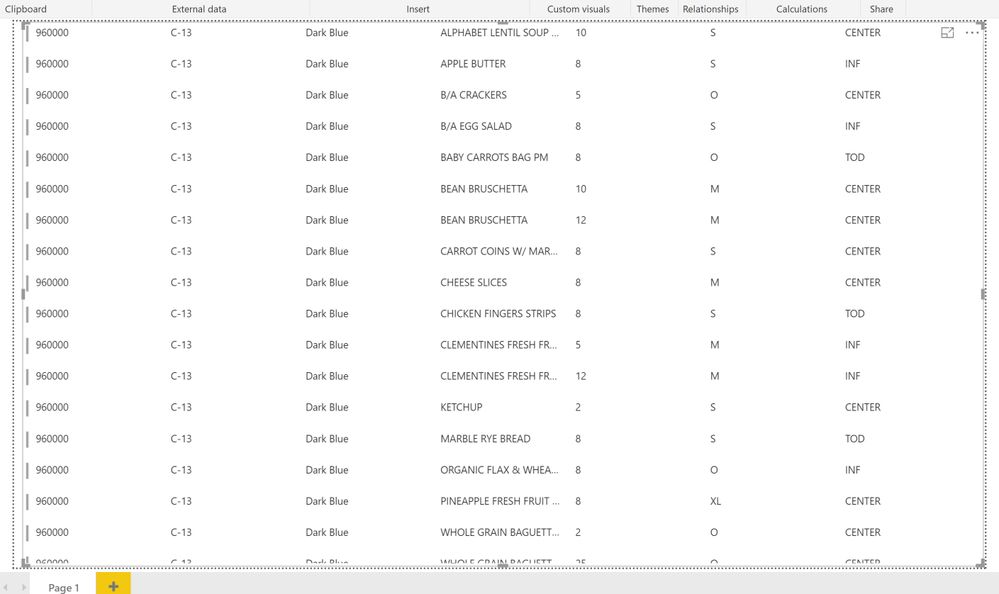
I have a table in powerbi that contains shipping label data. Each row in the table would represent a single label. Here is the table:
I basically need to display a page that would have a label for each row in the table above. Each label would have date, center, route color, label name, quantity, size, etc. I am currently attempting to do this using custom visuals, but I am beginning to doubt that custom visuals is the right way of achieving what I want. I need to print this information onto avery labels. I need input from the experts on the best way of achieving this...
@Anonymous,
It seems that you may just use the Multi-row card visual.
It seems that way, but how do I make 1 label per row, instead I am getting 1 label per row per column:
showing 1 card per column per row\
Do you think I can fetch the code from Github and modify it, or is there a built in way to modify this?!
@Anonymous,
You may try to manually adjust the width.
If you have recently started exploring Fabric, we'd love to hear how it's going. Your feedback can help with product improvements.
A new Power BI DataViz World Championship is coming this June! Don't miss out on submitting your entry.
Share feedback directly with Fabric product managers, participate in targeted research studies and influence the Fabric roadmap.
| User | Count |
|---|---|
| 1 | |
| 1 | |
| 1 | |
| 1 | |
| 1 |