
Get certified for free when you join Fabric Data Days 2026 and dive into Fabric, Power BI, SQL, AI, and other essential data skills.
Join nowJuly 7 - July 17 | Round 2 of the Power BI Dataviz World Championships. Don't miss your chance! Learn more
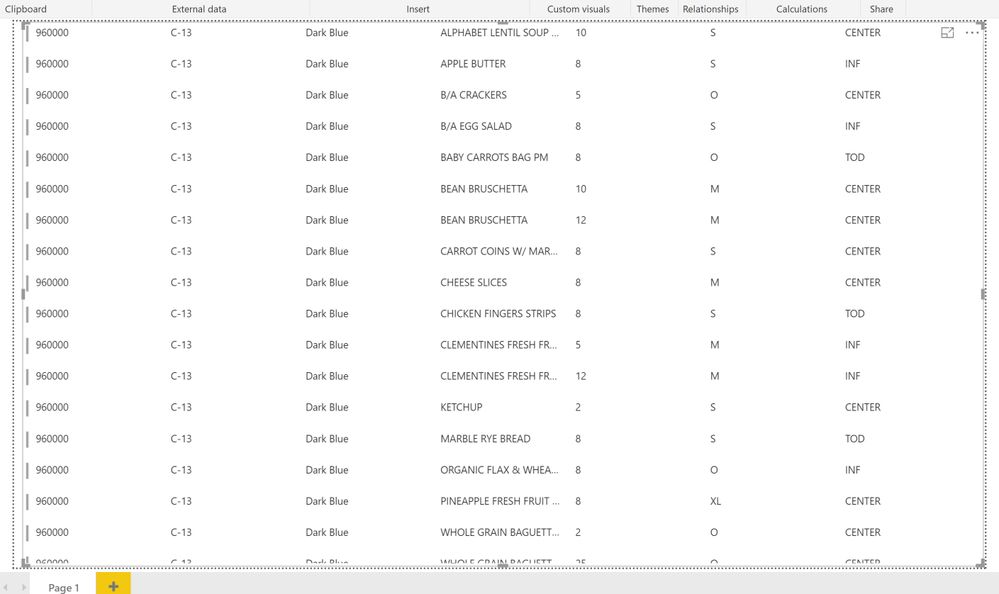
I have a table in powerbi that contains shipping label data. Each row in the table would represent a single label. Here is the table:
I basically need to display a page that would have a label for each row in the table above. Each label would have date, center, route color, label name, quantity, size, etc. I am currently attempting to do this using custom visuals, but I am beginning to doubt that custom visuals is the right way of achieving what I want. I need to print this information onto avery labels. I need input from the experts on the best way of achieving this...
@Anonymous,
It seems that you may just use the Multi-row card visual.
It seems that way, but how do I make 1 label per row, instead I am getting 1 label per row per column:
showing 1 card per column per row\
Do you think I can fetch the code from Github and modify it, or is there a built in way to modify this?!
@Anonymous,
You may try to manually adjust the width.
Join us in Barcelona for FabCon and SQLCon, the Fabric, Power BI, SQL, and AI community event. Save €200 with code FABCMTY200.
Join Fabric Data Days 2026: 60 days of free live/on-demand sessions, challenges, study groups, and certification opportunities.