Don't miss your chance to take the Fabric Data Engineer (DP-700) exam on us!
Learn moreWe've captured the moments from FabCon & SQLCon that everyone is talking about, and we are bringing them to the community, live and on-demand. Starts on April 14th. Register now
Hello,
In my SSAS tabular model I have the following measures, (which then used in Power BI Report):
% of Budget Used:=1.0 - DIVIDE(([Total Budget] - [Total Amount]), [Total Budget], BLANK())
% of Budget Used - consists from the followings:
Total Budget:=CALCULATE( SUM( 'GL Transactions'[Budget Amount] ), 'Calendar FY'[Date] )
Total Amount:= SUM( 'GL Transactions'[Amount])
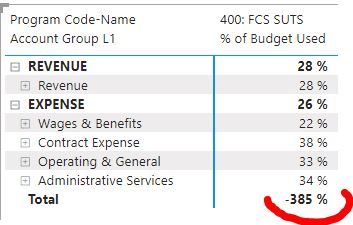
After exporting these in Power BI Model, my report has the following result:
Are there ways to filter out the negative(s) values (marked in red)? My goal is to have blank, when it's negative...
I thought of using IsInScope function, but it isn't available in my current SSAS tabuler
May be I need to use IsFiltered instead? How exactly?
Thanks for help!
Hi,
you could use conditional formatting on color of that field and set that if the value is negative then color is white!
Chiara
If you have recently started exploring Fabric, we'd love to hear how it's going. Your feedback can help with product improvements.
A new Power BI DataViz World Championship is coming this June! Don't miss out on submitting your entry.
Share feedback directly with Fabric product managers, participate in targeted research studies and influence the Fabric roadmap.
| User | Count |
|---|---|
| 1 | |
| 1 | |
| 1 | |
| 1 | |
| 1 |