Get certified for free when you join Fabric Data Days 2026 and dive into Fabric, Power BI, SQL, AI, and other essential data skills.
Join nowJuly 7 - July 17 | Round 2 of the Power BI Dataviz World Championships. Don't miss your chance! Learn more
Hello,
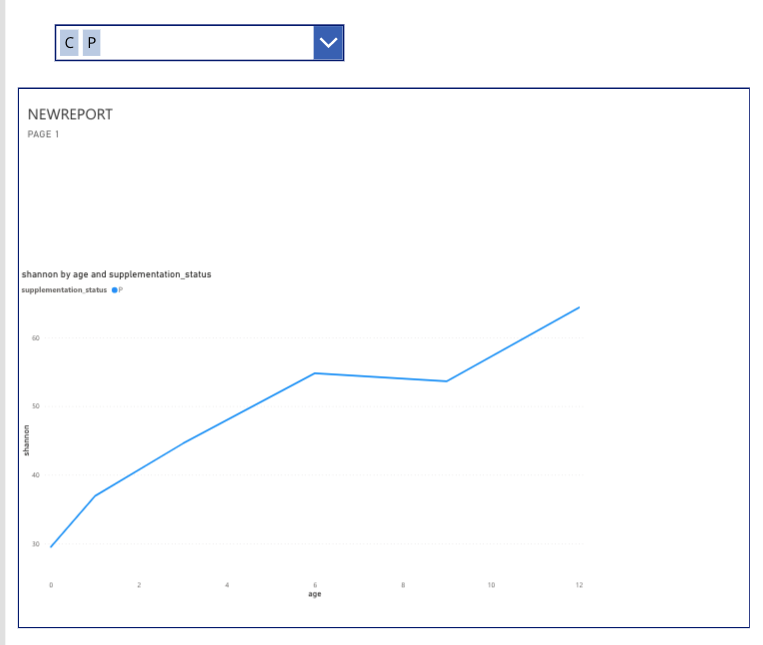
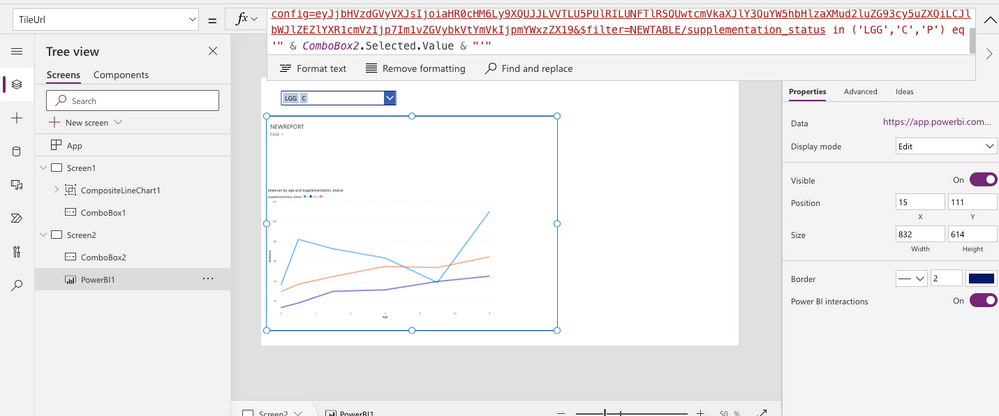
I am aiming to filter a line graph created as a tile on PowerBi based on the selection of the combobox. My goal is to have all three lines show up if all three fields are selected in the combobox, and just one line if only one of the fields is selected. The problem is that currently it is only showing the latest selection from the combobox on the linegraph. Thank you for the help!
The url for the linegraph from powerbi is:
"https://app.powerbi.com/embed?dashboardId=5ae39d0b-1661-4841-97e7-e80614f5a40e&tileId=bc445255-fadd-... eq '" & ComboBox2.Selected.Value & "'"
Solved! Go to Solution.
Hi @clodagh2
The URL with filter statement should be like below.
?filter=Store/Territory in ('NC', 'TN')
Ref - https://docs.microsoft.com/en-us/power-bi/collaborate-share/service-url-filters
Thanks
Hari
Hi,
This now has all three at the same time, but still isn't coordinated with the selections of the dropdown box. I attached a screenshot of it.
Hi @clodagh2
The URL with filter statement should be like below.
?filter=Store/Territory in ('NC', 'TN')
Ref - https://docs.microsoft.com/en-us/power-bi/collaborate-share/service-url-filters
Thanks
Hari
Join us in Barcelona for FabCon and SQLCon, the Fabric, Power BI, SQL, and AI community event. Save €200 with code FABCMTY200.
Join Fabric Data Days 2026: 60 days of free live/on-demand sessions, challenges, study groups, and certification opportunities.