cancel
Showing results for 
Search instead for 
Did you mean: 

We've captured the moments from FabCon & SQLCon that everyone is talking about, and we are bringing them to the community, live and on-demand. Starts on April 14th. Register now

Reply
pierre415
Helper I
Helper I

Filter column values based on 2 other columns

19885920_1441659535925600_796141086_o[1].jpg


Hey folks,

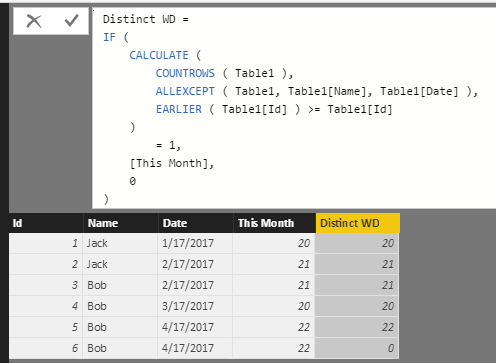
I'm trying to create a column like the one to the right in the picture, where every line is a project and I need to add up everyone's work days YTD. If say, two projects have the same month and same person then only one would need to count to the YTD workdays. Any idea how to do this? 

Thanks,

Pierre

2 ACCEPTED SOLUTIONS
prakash_gautam
Resolver II
Resolver II

Hello Pierre,


There could be better method but this DAX also works if you have a unique field the data set:


Distinct WD =
IF (
CALCULATE (
COUNTROWS ( Table1 ),
ALLEXCEPT ( Table1, Table1[Name], Table1[Date] ),
EARLIER ( Table1[Id] ) >= Table1[Id]
)
= 1,
[This Month],
0
)


distinct.png

Thanks,
Prakash

View solution in original post

Hello Pierre,


The AllEXCEPT gives the all rows of the table (for each Name and Date pair) and earlier gives the current row.
When we count all Id where Name and Date is equal AND current Id is >= all Id, we are left with the correct count.


The >= might be confusing. Please see below MSDN link where earlier has been described in detail:


https://msdn.microsoft.com/en-us/library/ee634551.aspx


Thanks,
Prakash

View solution in original post

5 REPLIES 5
prakash_gautam
Resolver II
Resolver II

Hello Pierre,


There could be better method but this DAX also works if you have a unique field the data set:


Distinct WD =
IF (
CALCULATE (
COUNTROWS ( Table1 ),
ALLEXCEPT ( Table1, Table1[Name], Table1[Date] ),
EARLIER ( Table1[Id] ) >= Table1[Id]
)
= 1,
[This Month],
0
)


distinct.png

Thanks,
Prakash

Hey Prakash could you explain to me how the Earlier function works in this scenario?


Thanks,

Pierre

Hello Pierre,


The AllEXCEPT gives the all rows of the table (for each Name and Date pair) and earlier gives the current row.
When we count all Id where Name and Date is equal AND current Id is >= all Id, we are left with the correct count.


The >= might be confusing. Please see below MSDN link where earlier has been described in detail:


https://msdn.microsoft.com/en-us/library/ee634551.aspx


Thanks,
Prakash

Awesome thanks Prakash!

Thanks man you're a legend

Helpful resources

Announcements
New to Fabric survey Carousel

New to Fabric Survey

If you have recently started exploring Fabric, we'd love to hear how it's going. Your feedback can help with product improvements.

Power BI DataViz World Championships carousel

Power BI DataViz World Championships - June 2026

A new Power BI DataViz World Championship is coming this June! Don't miss out on submitting your entry.

Join our Fabric User Panel

Join our Fabric User Panel

Share feedback directly with Fabric product managers, participate in targeted research studies and influence the Fabric roadmap.

March Power BI Update Carousel

Power BI Community Update - March 2026

Check out the March 2026 Power BI update to learn about new features.