This time we’re going bigger than ever. Fabric, Power BI, SQL, AI and more. We're covering it all. You won't want to miss it.
Learn moreDid you hear? There's a new SQL AI Developer certification (DP-800). Start preparing now and be one of the first to get certified. Register now
Hi
I see that Power BI Is now integrated with facebook, I have noticed that however whilst i can retrieve data for some pages, for others it gives back a data limit problem
e.g
Detail=https://graph.facebook.com/Starbucks/posts?limit=250
Can you advise on a workaround for this problem?
Thanks
Alexander
Solved! Go to Solution.
@Alexander24 wrote:
Hi
I see that Power BI Is now integrated with facebook, I have noticed that however whilst i can retrieve data for some pages, for others it gives back a data limit problem
e.g
Detail=https://graph.facebook.com/Starbucks/posts?limit=250
Can you advise on a workaround for this problem?
Thanks
Alexander
The limit not exceeding 100 is set by facebook API.
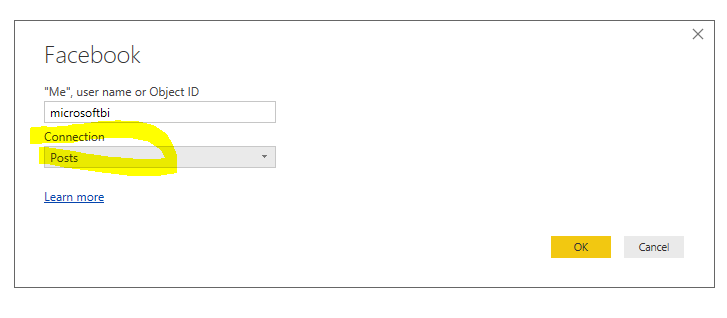
In your case, instead of choose "Posts"
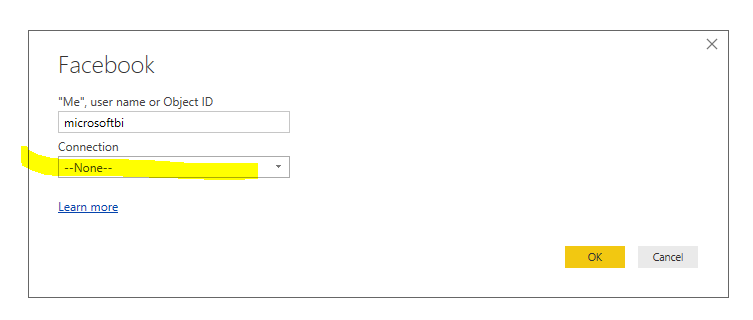
Choose a blank connection instead.
Then in the advanced Editor, append the extra uri
You don't worry about limit=10 or limit=100, based on my test, it would finally retrieve all posts information from facebook. The limit only affect how many records the API returns in each call.
@Alexander24 wrote:
Hi
I see that Power BI Is now integrated with facebook, I have noticed that however whilst i can retrieve data for some pages, for others it gives back a data limit problem
e.g
Detail=https://graph.facebook.com/Starbucks/posts?limit=250
Can you advise on a workaround for this problem?
Thanks
Alexander
The limit not exceeding 100 is set by facebook API.
In your case, instead of choose "Posts"
Choose a blank connection instead.
Then in the advanced Editor, append the extra uri
You don't worry about limit=10 or limit=100, based on my test, it would finally retrieve all posts information from facebook. The limit only affect how many records the API returns in each call.
Hi Eric_Zhang,
Thanks for the great solution. However, I'm facing another problem where it doesn't show all the columns from facebook. It just show only 5 columns instead of 28 columns before this. If I'm not mistaken, it is because of the new version of facebook API v2.8.
Do you have any suggestion on the workaround for this problem?
Thanks,
Naz79
Hi,
Starting API v2.8 only 5 columns are retrieved, if you want anything more than that you need to mention that specifically using URL params as shown below. You can check the column list for posts here:
https://developers.facebook.com/docs/graph-api/reference/v2.9/post
Facebook.Graph("https://graph.facebook.com/v2.8/microsoftbi/posts?fields=id,
admin_creator,
application,
call_to_action,
caption,
created_time,
description,
feed_targeting,
from,
icon,
instagram_eligibility,
is_hidden,
is_instagram_eligible,
is_published,
link,
message,
message_tags,
name,
object_id,
parent_id,
permalink_url,
picture,
place,
privacy,
properties,
shares,
source,
status_type,
story,
story_tags,
targeting,
to,
type,
updated_time,
with_tags&limit=100")
Cheers!!!
Thanks a lot.
Check out the April 2026 Power BI update to learn about new features.
Sign up to receive a private message when registration opens and key events begin.
If you have recently started exploring Fabric, we'd love to hear how it's going. Your feedback can help with product improvements.
| User | Count |
|---|---|
| 4 | |
| 2 | |
| 1 | |
| 1 | |
| 1 |