If more information need to be provided, please let me know.
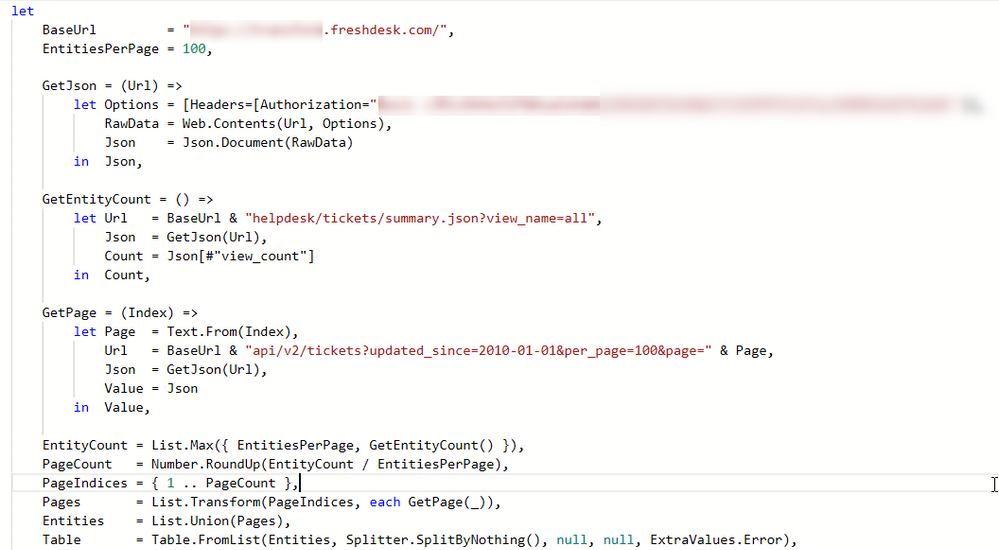
Here's the full query:
let
    BaseUrl         = "https://servicedeskurl.freshdesk.com/api/v2/tickets?updated_since=2010-01-01&per_page=100&page=",
    EntitiesPerPage = 100,

    GetJson = (Url) =>
        let Options = [Headers=[Authorization="myApiKey"]],
            RawData = Web.Contents(Url, Options),
            Json    = Json.Document(RawData)
        in  Json,

    GetPage = (Index) =>
        let Page  = Text.From(Index),
            Url   = BaseUrl & Page,
            Json  = GetJson(Url),
            Value = Json
        in  Value,

    EntityCount = 1174,
    PageCount   = Number.RoundUp(EntityCount / EntitiesPerPage),
    PageIndices = { 1 .. PageCount },
    Pages       = List.Transform(PageIndices, each GetPage(_)),
    Entities    = List.Union(Pages),
    Table       = Table.FromList(Entities, Splitter.SplitByNothing(), null, null, ExtraValues.Error),
    #"Expanded Column1" = Table.ExpandRecordColumn(Table, "Column1", {"cc_emails", "fwd_emails", "reply_cc_emails", "ticket_cc_emails", "fr_escalated", "spam", "email_config_id", "group_id", "priority", "requester_id", "responder_id", "source", "company_id", "status", "subject", "association_type", "to_emails", "product_id", "id", "type", "due_by", "fr_due_by", "is_escalated", "custom_fields", "created_at", "updated_at", "associated_tickets_count", "tags"}, {"Column1.cc_emails", "Column1.fwd_emails", "Column1.reply_cc_emails", "Column1.ticket_cc_emails", "Column1.fr_escalated", "Column1.spam", "Column1.email_config_id", "Column1.group_id", "Column1.priority", "Column1.requester_id", "Column1.responder_id", "Column1.source", "Column1.company_id", "Column1.status", "Column1.subject", "Column1.association_type", "Column1.to_emails", "Column1.product_id", "Column1.id", "Column1.type", "Column1.due_by", "Column1.fr_due_by", "Column1.is_escalated", "Column1.custom_fields", "Column1.created_at", "Column1.updated_at", "Column1.associated_tickets_count", "Column1.tags"}),
    #"Expanded Column1.custom_fields" = Table.ExpandRecordColumn(#"Expanded Column1", "Column1.custom_fields", {"product", "cf_customerticketsystemreference", "vendor", "product_version", "external_ticket_vendor", "defect_bug_tracking"}, {"Column1.custom_fields.product", "Column1.custom_fields.cf_customerticketsystemreference", "Column1.custom_fields.vendor", "Column1.custom_fields.product_version", "Column1.custom_fields.external_ticket_vendor", "Column1.custom_fields.defect_bug_tracking"}),
    #"Extracted Values" = Table.TransformColumns(#"Expanded Column1.custom_fields", {"Column1.tags", each Text.Combine(List.Transform(_, Text.From), ","), type text}),
    #"Changed Type" = Table.TransformColumnTypes(#"Extracted Values",{{"Column1.status", type text}}),
    #"Replaced Value" = Table.ReplaceValue(#"Changed Type","2","Open",Replacer.ReplaceText,{"Column1.status"}),
    #"Replaced Value1" = Table.ReplaceValue(#"Replaced Value","3","Pending",Replacer.ReplaceText,{"Column1.status"}),
    #"Replaced Value2" = Table.ReplaceValue(#"Replaced Value1","4","Resolved",Replacer.ReplaceText,{"Column1.status"}),
    #"Replaced Value3" = Table.ReplaceValue(#"Replaced Value2","5","Closed",Replacer.ReplaceText,{"Column1.status"}),
    #"Replaced Value4" = Table.ReplaceValue(#"Replaced Value3","6","Defect",Replacer.ReplaceText,{"Column1.status"}),
    #"Replaced Value5" = Table.ReplaceValue(#"Replaced Value4","7","Enhancement Request",Replacer.ReplaceText,{"Column1.status"})
in
    #"Replaced Value5"
This actually works but as you can see, I'm entering the EntityCount manually.
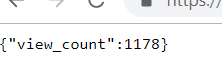
I want to get the EntityCount via the URL, this URL shows {"view_count":####} and i want to retrieve that #### and store it into a variable.
I hope my issue is clear enough to understand.