cancel
Showing results for 
Search instead for 
Did you mean: 

The Power BI Data Visualization World Championships is back! Get ahead of the game and start preparing now! Learn more

Reply
madeleinehaddad
New Member

Export Visualisation

Hi All, 

I'm hoping someone can help me. 

I have built a visualiation for the purpose of it being used on a website. 

Is someone able to please inform me how to export it as a way that it can show the visualisation and not a CSV?

I would like the whole image to show as an export. 

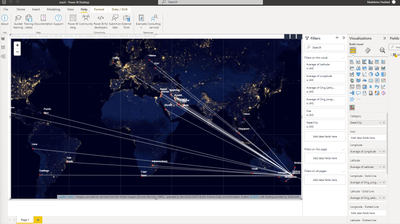
See below for an image of my creation. 

madeleinehaddad_0-1654228696217.png

Thank you in advance. 🙂 

1 ACCEPTED SOLUTION

Hi,

As per screenshot, you are using custom map visual. Export to PowerPoint as a Image or Live should work in your case.


Thanks

Hari

View solution in original post

5 REPLIES 5
madeleinehaddad
New Member

I tried to publish and export it, however i received this error. 


madeleinehaddad_0-1654566438206.png


lbendlin
Super User
Super User

Can this be done via a screenshot saved as an image ?


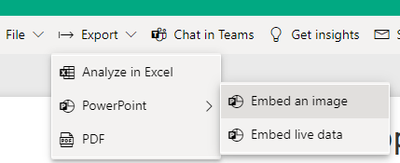
Have you considered the new PowerPoint integration?

lbendlin_0-1654267391652.png


Hi, 

That would be my last resort as i would rather export the visualisation. 

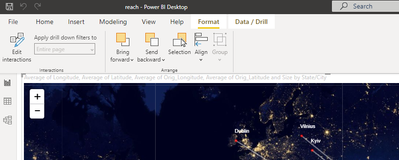
I do not have that banner on my Power Bi. Can you advise which version you are using? 

madeleinehaddad_0-1654482628939.png


Hi,

As per screenshot, you are using custom map visual. Export to PowerPoint as a Image or Live should work in your case.


Thanks

Hari

That feature is available in the Power BI service, after you publish your Desktop file to a workspace.

Helpful resources

Announcements
Power BI DataViz World Championships

Power BI Dataviz World Championships

The Power BI Data Visualization World Championships is back! Get ahead of the game and start preparing now!

December 2025 Power BI Update Carousel

Power BI Monthly Update - December 2025

Check out the December 2025 Power BI Holiday Recap!

FabCon Atlanta 2026 carousel

FabCon Atlanta 2026

Join us at FabCon Atlanta, March 16-20, for the ultimate Fabric, Power BI, AI and SQL community-led event. Save $200 with code FABCOMM.