Get certified for free when you join Fabric Data Days 2026 and dive into Fabric, Power BI, SQL, AI, and other essential data skills.
Join nowData Days is here! Join us now for 60+ days of learning, challenges, and connection. Learn more
Hi there,
Forgive me if this is a silly question or my terminology is not correct (embedding is not a strong point for me). I am looking to have a report embedded into an app, easy enough, I know how this can be done.
What ideally I would like is for example, click on a customer in the embedded PBI report and that will then populate that customer into a "Price Calculator Tool" which will be developed seperately. The idea is that with this "Price Calculator Tool" it will give the user the option whether to update a customers price, by writing back into the database.
The PBI is used to calculate the new price and the "Price Calculator Tool" is used to update the price or not.
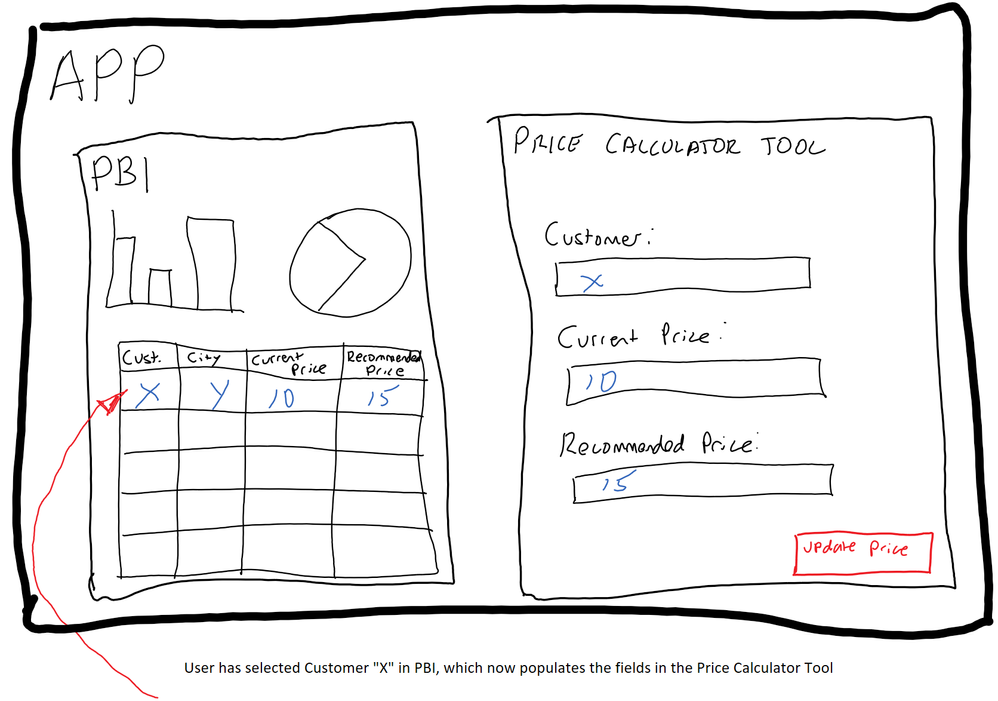
Can anyone tell me if this is in theory possible, and if so point me in the direction of some online resources?
Thanks,
Jake
Hi @jcarville,
As far as I know, it's not possible to get values out from an embedded report (as you described it in your scenario).
There is only the option to modify the report from your app using the PowerBI Javascript library.
You can use it to apply filters to your embedded report from your web application. It also allows you to navigate through pages and much more. There are also very nice demos.
Regards,
Thanos
Hi @Anonymous, thanks for your reply.
I feared it would not be possible the way I described.
One other option I'm thinking of is making the Price Calculator Tool using PowerApps and then using the PowerApps custom visual for PBI to get this into my App. I know with PowerApps you can write data and not just read it. Therefore, in theory I could have my stand alone "PBI report" and "Price Calulcator Tool" within the one "App" that would interact with each other.
Don't miss out on Data Days, June 15 through August 7. Learn Fabric, Power BI, SQL, AI and more.
Check out the May 2026 Power BI update to learn about new features.
| User | Count |
|---|---|
| 2 | |
| 2 | |
| 1 | |
| 1 | |
| 1 |