cancel
Showing results for 
Search instead for 
Did you mean: 

July 7 - July 17 | Round 2 of the Power BI Dataviz World Championships. Don't miss your chance! Learn more

Reply
BernardWilliam
Regular Visitor

Embedded for Customer: Cannot Save Report

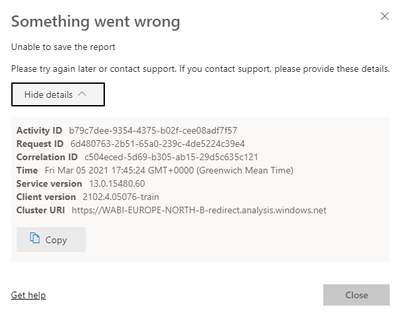
I have a some Power BI reports embedded in a ASP.Net Core App. It is using an Azure service principal to authenticate with the Power BI service. I display the report in edit mode, but once I click on Save. I get the following message

BernardWilliam_0-1614966468941.png

If I login to the powerbi.com I can save the report without any problem.  I wonder if the issue could be with app permissions on Azure. It has the following permissions

BernardWilliam_1-1614966670500.png

The Read.All is long standing, but the ReadWriteAll is new. "Save As" functionality is working.

Any help/suggestions appreciated.


Thanks,

Bernard

1 ACCEPTED SOLUTION

@V-lianl-msft 


Thank you the thread you refered to did indeed help to solve my problem. The code snippet in the thread is out of date as far as I can tell. The fix for my issue was to pass true for the AllowEdit parameter of the GenerateTokenRequestV2Report() method.


var reports = reportIds.Select(reportId => new GenerateTokenRequestV2Report(reportId, true)).ToList();


Thank you for your help.


Bernard

View solution in original post

2 REPLIES 2
V-lianl-msft
Community Support
Community Support

Hi @BernardWilliam ,


Please refer to the same thread:

https://community.powerbi.com/t5/Service/Unable-to-save-existing-report-Save-As-works-fine-via-Embed... 


Best Regards,
Liang
If this post helps, then please consider Accept it as the solution to help the other members find it more quickly.

@V-lianl-msft 


Thank you the thread you refered to did indeed help to solve my problem. The code snippet in the thread is out of date as far as I can tell. The fix for my issue was to pass true for the AllowEdit parameter of the GenerateTokenRequestV2Report() method.


var reports = reportIds.Select(reportId => new GenerateTokenRequestV2Report(reportId, true)).ToList();


Thank you for your help.


Bernard

Helpful resources

Announcements
FabCon and SQLCon Barcelona 2026

FabCon & SQLCon – Barcelona 2026

Join us in Barcelona for FabCon and SQLCon, the Fabric, Power BI, SQL, and AI community event. Save €200 with code FABCMTY200.

60 days of Data Days Carousel

Data Days 2026

Join Fabric Data Days 2026: 60 days of free live/on-demand sessions, challenges, study groups, and certification opportunities.

Power BI DataViz World Championships carousel

Power BI DataViz World Championships - June 2026

A new Power BI DataViz World Championship is coming this June! Don't miss out on submitting your entry.

Top Solution Authors