cancel
Showing results for 
Search instead for 
Did you mean: 

Data Days is here! Join us now for 60+ days of learning, challenges, and connection. Learn more

Reply
BernardWilliam
Regular Visitor

Embedded for Customer: Cannot Save Report

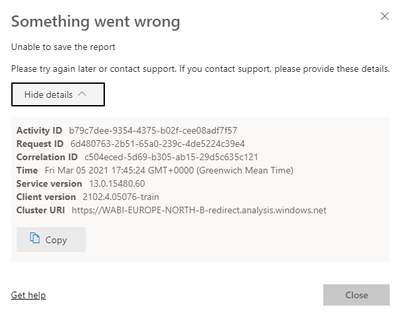
I have a some Power BI reports embedded in a ASP.Net Core App. It is using an Azure service principal to authenticate with the Power BI service. I display the report in edit mode, but once I click on Save. I get the following message

BernardWilliam_0-1614966468941.png

If I login to the powerbi.com I can save the report without any problem.  I wonder if the issue could be with app permissions on Azure. It has the following permissions

BernardWilliam_1-1614966670500.png

The Read.All is long standing, but the ReadWriteAll is new. "Save As" functionality is working.

Any help/suggestions appreciated.


Thanks,

Bernard

1 ACCEPTED SOLUTION

@V-lianl-msft 


Thank you the thread you refered to did indeed help to solve my problem. The code snippet in the thread is out of date as far as I can tell. The fix for my issue was to pass true for the AllowEdit parameter of the GenerateTokenRequestV2Report() method.


var reports = reportIds.Select(reportId => new GenerateTokenRequestV2Report(reportId, true)).ToList();


Thank you for your help.


Bernard

View solution in original post

2 REPLIES 2
V-lianl-msft
Community Support
Community Support

Hi @BernardWilliam ,


Please refer to the same thread:

https://community.powerbi.com/t5/Service/Unable-to-save-existing-report-Save-As-works-fine-via-Embed... 


Best Regards,
Liang
If this post helps, then please consider Accept it as the solution to help the other members find it more quickly.

@V-lianl-msft 


Thank you the thread you refered to did indeed help to solve my problem. The code snippet in the thread is out of date as far as I can tell. The fix for my issue was to pass true for the AllowEdit parameter of the GenerateTokenRequestV2Report() method.


var reports = reportIds.Select(reportId => new GenerateTokenRequestV2Report(reportId, true)).ToList();


Thank you for your help.


Bernard

Helpful resources

Announcements
Fabric Data Days is here Carousel

Fabric Data Days 2026

Don't miss out on Data Days, June 15 through August 7. Learn Fabric, Power BI, SQL, AI and more.

May Power BI Update Carousel

Power BI Monthly Update - May 2026

Check out the May 2026 Power BI update to learn about new features.

Power BI DataViz World Championships carousel

Power BI DataViz World Championships - June 2026

A new Power BI DataViz World Championship is coming this June! Don't miss out on submitting your entry.

Top Kudoed Authors