Don't miss your chance to take exam DP-600 or DP-700 on us!
Request nowLearn from the best! Meet the four finalists headed to the FINALS of the Power BI Dataviz World Championships! Register now
We have a lot of embedded PowerBI dashboards in an app for users to look at. It seems drop downs aren't working when we embed dashboards. Everything seems to work fine with reports, but dashboards have a tonne of problems when it comes to interacting and general performance.
The major issue we're facing is that the dropdowns seem to be nonfunctional. When you click on a drop-down, the items to select seem to go behind the dashboard itself. It looks like a z-index problem or something but they are completely invisible to the user and can't select one. The screenshot below (scratched out sensitive names):
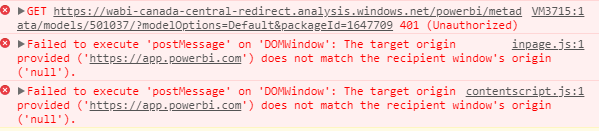
We're also experiencing 401 errors when displaying dashboards (again, reports are fine). This has been happening with every dashboard and it seems like some data just doesn't show up. Not sure how this could be the case as we're loading them with the API key like every other report/dashboard should.
For 401 error:
"
API call returning 401
A fiddler capture may be required to investigate further. The required permission scope may be missing for the registered application within Azure AD. Verify the required scope is present within the app registration for Azure AD within the Azure portal.
"
For Dashboard not display well, you may consider rise a support ticket for it.
https://powerbi.microsoft.com/en-us/support/
Regards,
Michael
Thanks for the reply!
How would a 401 be caused if the dashboard generates the majority of the dashboard but not all of it? I'm fairly certain all the dashboard components are in the same workspace.
I used Fidler and the 401 doesn't actually show up in the program. I can see all the 200s show up but the 401 doesn't.
This is the message if that helps at all
Share feedback directly with Fabric product managers, participate in targeted research studies and influence the Fabric roadmap.
Check out the February 2026 Power BI update to learn about new features.
| User | Count |
|---|---|
| 3 | |
| 3 | |
| 2 | |
| 1 | |
| 1 |
| User | Count |
|---|---|
| 3 | |
| 2 | |
| 2 | |
| 2 | |
| 2 |