cancel
Showing results for 
Search instead for 
Did you mean: 

Level up your Power BI skills this month - build one visual each week and tell better stories with data! Get started

Reply
rlansing
Resolver I
Resolver I

ERROR: Authorization_RequestDenied - Insufficient privileges to complete the operation (Native App)

Hello,

I know this has been discussed before:

https://community.powerbi.com/t5/Developer/ERROR-Authorization-RequestDenied-Insufficient-privileges...

But the marked answer does not solve my problem. I am trying to follow this guide to create a native app API access client id to create a PowerShell script that can refresh my reports after an event.

I created a new account, gave that account Power BI Administrator role in Office 365 and Admin rights over a few group workspaces. What else can I do to ensure that this user has the correct admin rights to register an app on this site?: https://dev.powerbi.com/apps


Thanks in advance!

Bobby

3 REPLIES 3
SuperTommy
New Member

I ran into the same problem. I changed this Users can register applications settings in AzureAD to Yes.


Azure AD Setting

Eric_Zhang
Microsoft Employee
Microsoft Employee


@rlansing wrote:

Hello,

I know this has been discussed before:

https://community.powerbi.com/t5/Developer/ERROR-Authorization-RequestDenied-Insufficient-privileges...

But the marked answer does not solve my problem. I am trying to follow this guide to create a native app API access client id to create a PowerShell script that can refresh my reports after an event.

I created a new account, gave that account Power BI Administrator role in Office 365 and Admin rights over a few group workspaces. What else can I do to ensure that this user has the correct admin rights to register an app on this site?: https://dev.powerbi.com/apps


Thanks in advance!

Bobby


@rlansing

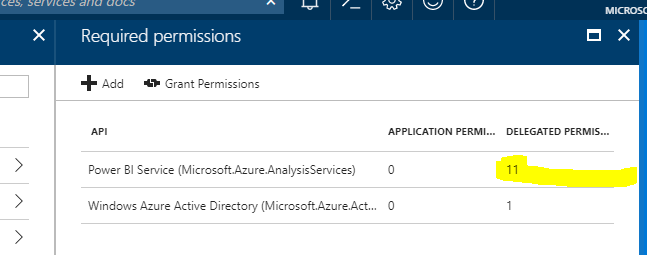
Please check if sufficient permissions are granted to the registered app. See Apply permissions to your application within Azure AD.  By the way, the refresh API is sharing the 8 times (48 times for Premium license) refreshing limitation a day.

Capture.PNG


I only see a 5 in the highlighted area. I can add permissions to that screen. but the error is happening when trying to register the app via the website. My account has Multi-Factor Auth enabled, so I cannot use it for the PowerShell to refresh datasets, so I created a Power BI Admin account to run this process, but it is receiving the error listed above when trying to register the app. My question is: what permissions does the user need to have to register the app?

Helpful resources

Announcements
April Power BI Update Carousel

Power BI Monthly Update - April 2026

Check out the April 2026 Power BI update to learn about new features.

Fabric SQL PBI Data Days

Data Days 2026 coming soon!

Sign up to receive a private message when registration opens and key events begin.

New to Fabric survey Carousel

New to Fabric Survey

If you have recently started exploring Fabric, we'd love to hear how it's going. Your feedback can help with product improvements.

Power BI DataViz World Championships carousel

Power BI DataViz World Championships - June 2026

A new Power BI DataViz World Championship is coming this June! Don't miss out on submitting your entry.