cancel
Showing results for 
Search instead for 
Did you mean: 

Learn from the best! Meet the four finalists headed to the FINALS of the Power BI Dataviz World Championships! Register now

Reply
tranpeter
New Member

Dynamically rename column based on a mapping table

Hi,


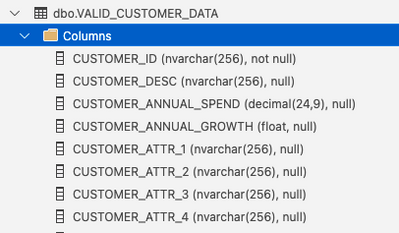
I currently have in my database a table that looks like this:

tranpeter_1-1664483306300.png


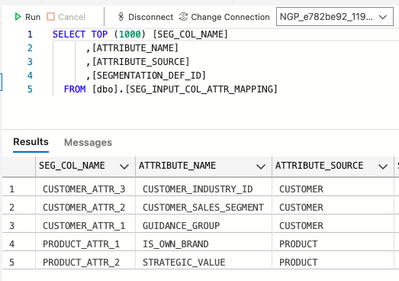
We also have another table that provides the descriptive mapping for each generic column name. For example, CUSTOMER_ATTR_1 can be GEOGRAPHY for one customer and it can be COLOR for another customer.


tranpeter_2-1664483360501.png


When I display on PowerBI the data from the VALID_CUSTOMER_DATA.CUSTOMER_ATTR_1, I want to display CUSTOMER_INDUSTRY_ID. For CUSTOMER_ATTR_2, I want to display CUSTOMER_SALES_SEGMENT and for CUSTOMER_ATTR_3, I want to display GUIDANCE_GROUP.


Is this dynamic renaming of columns based on a mapping table doable in PowerBI?


Thank you!

-Peter


1 ACCEPTED SOLUTION
Anonymous
Not applicable

Hi @tranpeter ,

You can refer the following links to rename column names dynamically:

Dynamically rename columns from a column names table

Table.RenameColumns(
Source,
List.Zip( {fOldColumnNames("TableName"), fNewColumnNames("TableName") } )
)

Using M to dynamically change column names in PowerQuery

Dynamic Column Names in Power Query


Any comment or problem, please feel free to let me know.

Best Regards

View solution in original post

3 REPLIES 3
tranpeter
New Member

A coworker pointed me to this solution. I'll have to give it a try and update this post on whether this worked.

Anonymous
Not applicable

Hi @tranpeter  ,

Did you get it worked? If yes, could you please mark the helpful post as Answered? It will help the others in the community find the solution easily if they face the same problem as yours. Thank you.

Best Regards

Anonymous
Not applicable

Hi @tranpeter ,

You can refer the following links to rename column names dynamically:

Dynamically rename columns from a column names table

Table.RenameColumns(
Source,
List.Zip( {fOldColumnNames("TableName"), fNewColumnNames("TableName") } )
)

Using M to dynamically change column names in PowerQuery

Dynamic Column Names in Power Query


Any comment or problem, please feel free to let me know.

Best Regards

Helpful resources

Announcements
Power BI DataViz World Championships carousel

Power BI DataViz World Championships - June 2026

A new Power BI DataViz World Championship is coming this June! Don't miss out on submitting your entry.

Join our Fabric User Panel

Join our Fabric User Panel

Share feedback directly with Fabric product managers, participate in targeted research studies and influence the Fabric roadmap.

March Power BI Update Carousel

Power BI Community Update - March 2026

Check out the March 2026 Power BI update to learn about new features.