Share feedback directly with Fabric product managers, participate in targeted research studies and influence the Fabric roadmap.
Sign up nowGet Fabric certified for FREE! Don't miss your chance! Learn more
Hi, I have data that I want a unique solution to, and it is quite a challenge. Here is the dilemma:
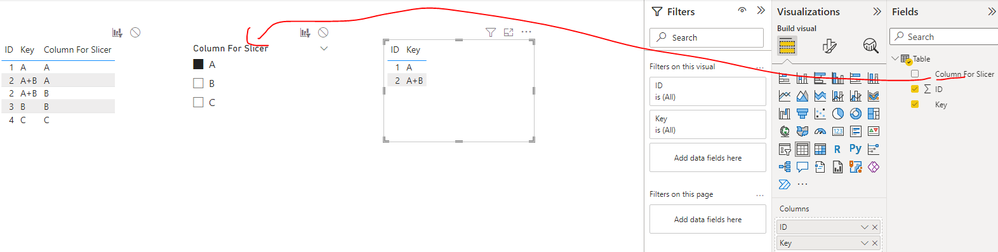
I need to filter out the "Duplicate" ID values to only show a consolidated view as in below;
I need to remove the "Column for slicer" column in the end to show ID and key ONLY.
I cannot simply put "Column for Slicer" in the slicer of my visualization because it would not properly function to display ID of "2" when selecting filter A.
ID Key Column For Slicer
1 A A
2 A+B A
2 A+B B
3 B B
4 C C
Can anyone help with this?
Solved! Go to Solution.
Hi @SGK1228 ,
What's your expected result when the slicer select A? Whether the below screenshot is what you want? If no, could you please provide more details on it? Thank you.
Best Regards
Hi @SGK1228 ,
What's your expected result when the slicer select A? Whether the below screenshot is what you want? If no, could you please provide more details on it? Thank you.
Best Regards
If you love stickers, then you will definitely want to check out our Community Sticker Challenge!
Check out the January 2026 Power BI update to learn about new features.
| User | Count |
|---|---|
| 3 | |
| 2 | |
| 1 | |
| 1 | |
| 1 |
| User | Count |
|---|---|
| 5 | |
| 4 | |
| 3 | |
| 2 | |
| 2 |