Don't miss your chance to take the Fabric Data Engineer (DP-600) exam for FREE! Find out how by attending the DP-600 session on April 23rd (pacific time), live or on-demand.
Learn moreNext up in the FabCon + SQLCon recap series: The roadmap for Microsoft SQL and Maximizing Developer experiences in Fabric. All sessions are available on-demand after the live show. Register now
Hi,
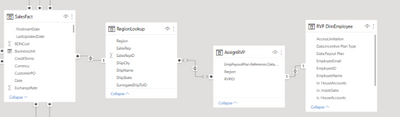
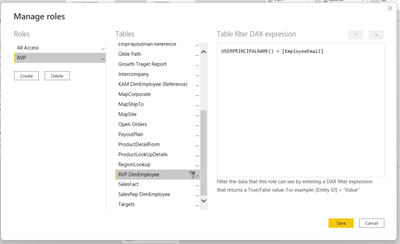
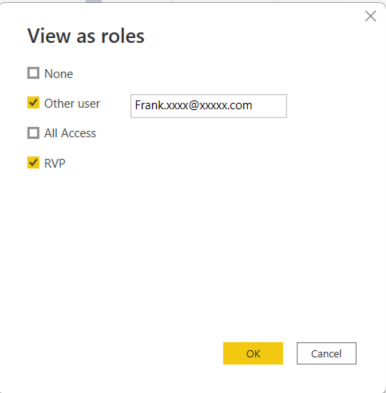
I am sure this is something simple but I can't seem to figure it out. I have dynamic RLS set up using USERPRINCIPALNAME(). When I test with a user's email address it filters nothing.
I created a slicer to test the filtering directly with the same user and it works. Any idea what the issue could be? I have a few other reports with similar data models that are exhibiting the same behavior.
Solved! Go to Solution.
Hi @nbs333 ,
By default, row-level security filtering uses single-directional filters, whether the relationships are set to single direction or bi-directional. You can manually enable bi-directional cross-filtering with row-level security by selecting the relationship and checking the Apply security filter in both directions checkbox. Note that if a table takes part in multiple bi-directional relationships you can only select this option for one of those relationships. Select this option when you've also implemented dynamic row-level security at the server level, where row-level security is based on username or login ID.
For more information, see Bidirectional cross-filtering using DirectQuery in Power BI Desktop and the Securing the Tabular BI Semantic Model technical article.
Best Regards,
Rico Zhou
If this post helps, then please consider Accept it as the solution to help the other members find it more quickly.
Hi @nbs333 ,
By default, row-level security filtering uses single-directional filters, whether the relationships are set to single direction or bi-directional. You can manually enable bi-directional cross-filtering with row-level security by selecting the relationship and checking the Apply security filter in both directions checkbox. Note that if a table takes part in multiple bi-directional relationships you can only select this option for one of those relationships. Select this option when you've also implemented dynamic row-level security at the server level, where row-level security is based on username or login ID.
For more information, see Bidirectional cross-filtering using DirectQuery in Power BI Desktop and the Securing the Tabular BI Semantic Model technical article.
Best Regards,
Rico Zhou
If this post helps, then please consider Accept it as the solution to help the other members find it more quickly.
If you have recently started exploring Fabric, we'd love to hear how it's going. Your feedback can help with product improvements.
A new Power BI DataViz World Championship is coming this June! Don't miss out on submitting your entry.
Share feedback directly with Fabric product managers, participate in targeted research studies and influence the Fabric roadmap.
| User | Count |
|---|---|
| 1 | |
| 1 | |
| 1 | |
| 1 | |
| 1 |
| User | Count |
|---|---|
| 5 | |
| 4 | |
| 3 | |
| 3 | |
| 2 |